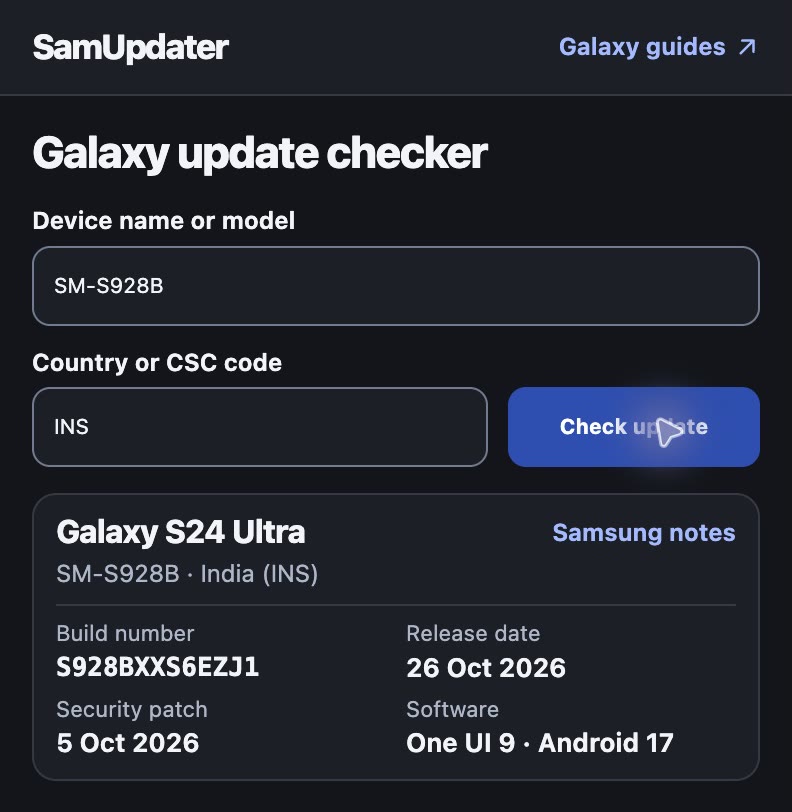
SamUpdater lets you check Samsung Galaxy updates from the Chrome toolbar. Enter your model and CSC, the code for your region or carrier, to see the latest firmware Samsung lists and open its release notes.
For Chrome 116 or newer on your computer. See the setup steps.
Install SamUpdater in Chrome
- Extract the ZIP you downloaded.
- Type
chrome://extensionsinto the address bar and turn on Developer mode. - Click Load unpacked and choose the extracted
samupdater-chrome-extension-mainfolder. It should containmanifest.json. - Open Chrome's Extensions menu and pin SamUpdater to your toolbar.

Keep the extracted folder in place. Chrome reads the extension files from there. Google's setup instructions.
Check your Galaxy's build
If you have a carrier model, I'd enter the full model number from Settings > About phone. Our Galaxy CSC guide shows where to find the code on your phone.
- Open SamUpdater and fill in Device name or model and Country or CSC code.
- Click Check update to see the build number, release date and security patch. Look under Software for the One UI and Android versions when Samsung includes them in the notes.
- On your Galaxy, go to Settings > About phone > Software information > Build number and compare it with the build in Chrome.
Scroll down to Latest releases for a quick look at other recent builds. Our Samsung firmware tracker has the longer list.
Frequently asked questions
Does the extension install Galaxy updates?
You install updates on the Galaxy itself. Open Settings > Software update > Download and install to see what's available for your phone. Samsung can list a build before it arrives on your carrier or in your region. Samsung's software update instructions.
What does SamUpdater send when I run a check?
When you click Check update, SamUpdater receives the model number and CSC you entered. Opening the popup also fetches the recent release feed. You can do both without signing in, and the extension omits cookies from both requests. Read the extension privacy policy.
If your lookup looks off, send us your model number and CSC and tell us what Chrome shows.