
To check the security patch level on a Samsung Galaxy phone, open Settings > About phone > Software information and look at the line that says Android security patch level. It takes about 20 seconds, and it works on every Galaxy phone and tablet running One UI.
That’s the short version. In this guide, I will show you three ways to find it, how to read what you see and how to tell if your phone is behind.
Here’s why you need it. Samsung pushes a new security patch almost every month, and the One UI version on its own won’t tell you if your phone is up to date. The patch date will.
What is the security patch level on a Samsung phone?
The security patch level is a date. It tells you the latest month of Android and Samsung security fixes your phone has installed.
So if your Galaxy S25 shows October 2026, it has every fix Samsung listed in its October 2026 bulletin and every one before it. If it shows July 2026, you’re missing three months of fixes.
Each month, Samsung publishes what it fixed on its Samsung Mobile Security bulletin page. We wrote up the October 2026 security bulletin if you want to see what this month’s patch covers.
Method 1: Check the security patch level in Software information
This is the method I use, and it shows you everything in one place.
- Open Settings on your Galaxy phone.
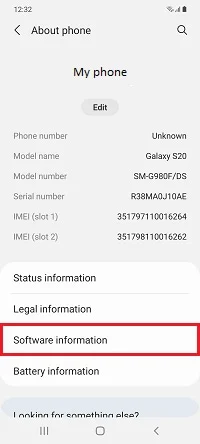
- Scroll all the way down and tap About phone (on a tablet it’s About tablet).
- Tap Software information.
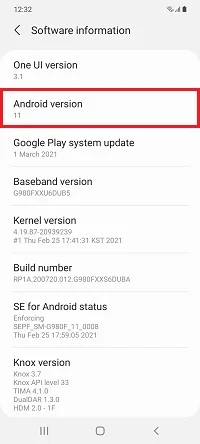
- Look for Android security patch level. The date under it is your patch level.
On the same screen you’ll also see the One UI version, the Android version and the Build number. Keep the build number handy. It’s the most exact way to compare your firmware with what’s out there.
Method 2: Check it from Security and privacy
On One UI 6 and newer, Samsung also shows the patch date in the security settings. This screen is handy because it splits the two kinds of security updates your phone gets.
- Open Settings.
- Tap Security and privacy.
- Tap Updates.
- You’ll see Security update with the date of your current patch, and Google Play system update with its own date.
The first one comes from Samsung through Software update. The second one comes from Google through the Play Store system and updates on its own schedule. Both matter, but the Samsung one is what people mean when they talk about the monthly patch.
Method 3: Find your build number with a dialer code
This one doesn’t show the patch date directly, but it gives you the full firmware details.
- Open the Phone app.
- Dial *#1234#.
- You’ll see three lines: AP, CP and CSC.
The AP line is your build number, for example S938BXXU5BZJ1 on a Galaxy S25 Ultra. The two letters just before the last character (Z and J here) tell you the year and month the firmware was built. Our guide to Samsung firmware version numbers breaks down every character.
If *#1234# does nothing on your phone, your carrier has likely blocked dialer codes. Use Method 1 instead.
How do I know if my security patch is out of date?
Compare your patch date with the latest one Samsung released for your exact model and country. A phone on a monthly update schedule should never be more than one or two months behind.
The easiest way is to look up your model number (like SM-S931B or SM-A566E) on our Samsung security update tracker. It shows the newest build and patch for each region as soon as it hits Samsung’s servers.
Keep in mind that not every Galaxy gets monthly patches. Older and budget phones move to quarterly or twice-a-year updates. Samsung lists which phones are on which schedule on its security bulletin page.
How to update to the latest security patch
If you’re behind, here’s how to get the newest patch.
- Connect to Wi-Fi and make sure your battery is above 20%.
- Go to Settings > Software update.
- Tap Download and install.
- If an update shows up, tap Download, then Install now.
- Check Settings > About phone > Software information again after the restart to confirm the new date.
For the Google side, go to Settings > Security and privacy > Updates > Google Play system update and tap it to check.
FAQ
Is the security patch level the same as the One UI version?
No. The One UI version (like One UI 9) is the software version and changes about once a year. The security patch level changes almost every month, even when the One UI version stays the same. Big upgrades usually bring a new patch too. The Galaxy S23 One UI 9 stable update came with the October 2026 patch, for example.
Why does my phone show an older patch than my friend’s phone?
Samsung rolls out patches by model and country, and carriers add their own delay. Two Galaxy S25 phones in different countries can be a month apart for a few weeks.
Does a factory reset change the security patch level?
No. A factory reset wipes your data, but the firmware and its patch date stay the same.
Is it safe to use a phone with an old security patch?
For a few months, mostly yes. But if your phone hasn’t had a patch in over a year, it’s missing fixes for known bugs that apps and websites can abuse. I’d avoid banking on it at that point.
Was this guide helpful?
Your answer helps us keep it accurate.
Comments (0)
Comments are moderated, and published only if they are relevant to the topic and add value in a constructive way. If you disagree with something, please be polite and respectful.