
S948BXXU4BZI6. It looks like someone mashed a keyboard, right?
But every single character in a Samsung firmware version means something. Once you know how to read it, you can tell the model, region, update type, One UI version and even the release month at a glance.
More importantly, you’ll know whether you can downgrade, and whether a firmware file is safe to flash on your phone. Let me break it down for you.
Where to Find Your Firmware Version
First, let’s find the build number on your phone:
- Open Settings.
- Tap About phone.
- Tap Software information.
- Look at Build number.
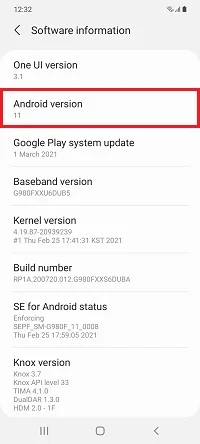
You’ll see something like S948BXXU4BZI6. The part you care about is usually the last 13 or so characters. The same string shows up in the firmware file names you download for Odin.
Samsung Firmware Version Explained, Character by Character
I will use S948BXXU4BZI6 as the example. It follows the format of a global Galaxy S26 Ultra One UI 9 build, and it matches the real Korean build S948NKSU4BZI6 in every part except the model and region. Here’s what each part means:
| Part | Example | What it means |
|---|---|---|
| Model | S948B |
The device. S948 is the Galaxy S26 Ultra, and B is the global variant. |
| Region | XX |
Where the firmware is meant for. XX is Europe and many global markets. |
| Update type | U |
U means a feature update. S means a security-only update. |
| Binary | 4 |
The bootloader version. This decides whether you can downgrade. |
| One UI version | B |
How many major One UI releases the phone has had. A is the launch version. |
| Year | Z |
The build year. Z is 2026. |
| Month | I |
The build month. A is January, so I is September. |
| Build | 6 |
The build count for that month. It goes 1 to 9, then A to Z. |
So S948BXXU4BZI6 reads as: Galaxy S26 Ultra, global, feature update, binary 4, first major upgrade (One UI 9), built in September 2026, sixth build of the month.
That’s it. Once you see it this way, it’s hard to unsee.
The Model Part
The first letters tell you the device family. S is the Galaxy S series, F is the Galaxy Z Fold and Flip, A is the Galaxy A series, and X is Galaxy Tab.
The letter after the number tells you the variant:
- B: global unlocked (Europe, India, Asia and more).
- N: South Korea.
- U: US carrier models (Verizon, AT&T, T-Mobile).
- U1: US unlocked.
- 0: China and Hong Kong.
This is why a Korean S948N build and a global S948B build are different firmware, even for the same phone.
The Region Code
The two letters after the model tell you who the firmware is built for. Some common ones:
- XX: Europe and several global markets, including India.
- KS: South Korea.
- SQ: US carrier firmware.
- UE: US unlocked firmware.
This is not the same as your CSC (like INS, XEU or TMB). The CSC decides your carrier and country settings. If you want to know more, read my post on CSC and HOME_CSC files.
Update Type: U or S
If the letter is U, the update includes feature changes or a new One UI version. If it’s S, it’s a security patch only.
For example, S948NKSU4BZI6 is the One UI 9 feature update. If Samsung later releases a build like S948NKSS4BZJ1, with an S in that spot, it would be a monthly security update only.
Why the Binary Number Matters Most
This is the one number you should always check before flashing anything.
Samsung’s bootloader won’t let you flash firmware with a lower binary than the one on your phone. If your phone is on binary 5, you can’t flash a binary 4 build. Odin will just show “SW REV CHECK FAIL”.
Here’s a real example. The Galaxy S26 Ultra’s One UI 9 build in Korea is S948NKSU4BZI6, and the older One UI 8.5 build is S948NKSU4AZHJ. Both have binary 4, so you can go back. I have explained the full process in my guide to downgrade One UI 9 to One UI 8.5.
The binary only goes up. Once you install a firmware with a higher binary, you can never go back to a lower one, even with official firmware.
The One UI Version Letter
This letter counts major One UI releases since the phone’s launch. A is the version the phone shipped with, B is the next major release, C is the one after that, and so on.
The Galaxy S26 launched with One UI 8.5 on Android 16, so its builds start with A. One UI 9 on Android 17 bumps it to B.
Note that it counts One UI releases, not only Android versions. The Galaxy S25 Ultra went from B (One UI 8) to C with One UI 8.5 (build S938BXXU9CZDP), even though both run Android 16.
So if the letter changes, it’s a major One UI update. That’s a quick way to spot one.
Year, Month and Build
The last three characters tell you when the firmware was built.
For the year, Samsung uses letters that move forward each year. X was 2024, Y was 2025 and Z is 2026.
For the month, A is January, B is February, and it goes all the way to L for December. So H is August, I is September and J is October.
The last character is the build number within that month. 1 to 9 come first, then A to Z if Samsung makes more builds.
How to Use This When Downloading Firmware
When you download firmware with the Frija tool or check the latest security update checker, you can now tell right away:
- Is this for my exact model and variant?
- Is the binary the same or higher than what I have?
- Is it newer than my current build?
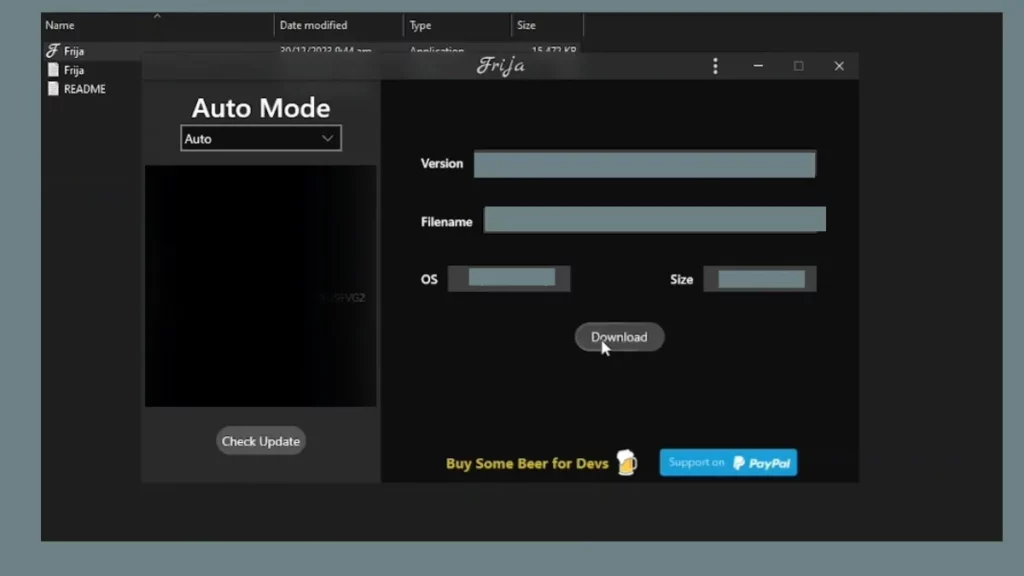
If all three are yes, the firmware is safe to flash with Odin.
Frequently Asked Questions
Why do AP, BL, CP and CSC files have slightly different versions?
Sometimes Samsung doesn’t update the modem (CP) in every build. It’s normal for the CP version to lag a little behind the AP version.
Can I flash a firmware with a different region code?
On global B models, usually yes, since they share the same hardware. On US and Korean models, stick to firmware for your exact variant.
Final Words
Reading a Samsung firmware version is one of those small skills that saves you a lot of trouble, especially if you flash firmware with Odin.
Got a build number you’re not sure about? Paste it in the comments below along with your model number, and I’ll decode it for you.
Was this guide helpful?
Your answer helps us keep it accurate.
Comments (0)
Comments are moderated, and published only if they are relevant to the topic and add value in a constructive way. If you disagree with something, please be polite and respectful.