
One UI 9 is now rolling out to the Galaxy S24, S25, Z Fold7, Z Flip7 and a bunch of A series phones. And as with every big update, a few of the changes are rubbing people the wrong way.
I went through the most upvoted complaint threads on r/oneui this week to see what people are actually stuck on. Some of these have a proper fix, some only have a workaround, and a couple can’t be changed at all right now.
In this guide, I will show you how to fix the most annoying One UI 9 changes, one by one. I will also tell you plainly which ones don’t have a fix yet, so you don’t waste an evening hunting for a toggle that isn’t there.
If your phone hasn’t received the update yet, check the One UI 9 update tracker for your model first.
Quick look: what can be fixed
| Change in One UI 9 | Fix available? |
|---|---|
| Now Bar moved up on the lock screen | Yes, if you can live without fingerprint login |
| Phone dialer is gray in dark mode | Workaround (Color palette) |
| App sizes missing from the Apps list | Yes, through the app’s Storage page |
| Now nudge pop-ups next to messages | Yes, turn it off in Galaxy AI settings |
| Wi-Fi and Bluetooth panel pops up on every tap | Workaround (Modes and Routines) |
| Thick brightness and volume sliders | No fix yet |
| Gray “off” toggles in the Quick panel | No fix yet |
1. Now Bar moved up on the lock screen
This one got the most attention. A post on r/oneui asking why the Now Bar suddenly sits higher on the lock screen got over 250 upvotes in a day.
So, why does it happen? It’s not a bug. If your phone has an optical fingerprint sensor under the display (most Galaxy A and FE models) and you have a fingerprint registered, One UI 9 pushes the Now Bar up to keep it clear of the sensor area. As users in that thread explained, it stays in the lower position if fingerprint login is off, or if your phone uses an ultrasonic or side-mounted sensor.
The OP tried fingerprint login for the first time after the update, didn’t like it, and that’s exactly when the bar moved. If you don’t really use fingerprint login either, you can remove it:
- Open “Settings” and go to “Security and privacy”.
- Tap “Biometrics” and then “Fingerprints”.
- Confirm your PIN, pattern or password.
- Tap the registered fingerprint and select “Remove”. Repeat for every fingerprint you have saved.
Lock the phone and the Now Bar should drop back down. If you’d rather keep fingerprint login, there’s no setting to move the bar yourself. You’ll have to live with the new spot.
2. Phone dialer is gray instead of black in dark mode
If you use dark mode, open the Phone app and look at the keypad. The background is a dark gray, while the Recents and Contacts tabs are proper AMOLED black. A Reddit thread with over 100 upvotes points out that this has been around since One UI 8.5 and One UI 9 didn’t fix it.
The OP noticed it only happens with Color palette turned off. Several users in the thread confirmed that turning Color palette on changes the keypad background to black. Here’s how:
- Long press an empty spot on the home screen and tap “Wallpaper and style”. You can also open it from “Settings”.
- Tap “Color palette”.
- Turn the toggle on and pick a palette.
The downside is obvious. Color palette tints the rest of the system too, so pick the most neutral option you can find. One user said Samsung told them through the Samsung Members app that a fix is coming in a later update. I can’t confirm that, so treat the palette trick as the fix for now.
3. App sizes are missing from the Apps list
On One UI 8.5, the Apps list in Settings showed how much space each app was using right under its name. One UI 9 removed that line. A thread about it crossed 100 upvotes, and a few people noticed the total app count at the top is gone too.
The size is still there. It’s just one tap deeper:
- Go to “Settings” and tap “Apps”.
- Tap the app you want to check.
- Scroll down and tap “Storage”.
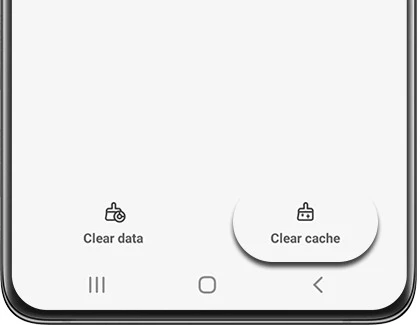
This page shows the app size, data and cache separately. If an app’s cache has grown huge, you can tap “Clear cache” right here. Don’t tap “Clear data” unless you’re fine with signing back in and losing the app’s settings.
If you want to find the biggest apps quickly, the OP mentions that the storage view now sorts apps by size and also includes system files. That’s the faster route when you’re trying to free up space.
4. Now nudge suggestions next to your messages
Some users started seeing a small suggestion chip pop up next to messages that mention a date. One r/oneui user asked how to get rid of it, and the top reply had the answer. It’s a Galaxy AI feature called Now nudge.
To turn it off:
- Open “Settings” and tap “Galaxy AI”.
- Tap “Now nudge”.
- Turn the toggle off.
That’s it. If your phone shows the menu in another language, the feature name may be translated. Look for it under the Galaxy AI menu anyway.
5. The Wi-Fi and Bluetooth panel pops up every time
Tap the Bluetooth or Wi-Fi tile in the Quick panel and One UI opens a list of devices or networks instead of just switching it on. People really hate this one. But here’s the thing, it isn’t new. Users in this thread pointed out it’s been there since around One UI 3, and there’s no toggle to turn it off.
The best workaround I found came from a user in the same thread. If you always turn on Bluetooth or Wi-Fi in the same situation (like when you get home), let a routine do it for you. The pop-up doesn’t show up when a routine flips the switch.
- Go to “Settings” and tap “Modes and Routines”.
- Switch to the “Routines” tab and tap the “+” button.
- Under “If”, pick a trigger. A place, a time or connecting to your home Wi-Fi all work well.
- Under “Then”, add “Bluetooth” (or “Wi-Fi”) and set it to on.
- Tap “Save” and give the routine a name.
You can make a second routine that turns it off when you leave.
6. Thick brightness and volume sliders
The new brightness and volume sliders are a lot chunkier than before. I checked the most popular thread on this, and sadly there’s no way to make them thin again.
Someone suggested lowering “Screen zoom” under Settings > Display. Other users tested it and found it only shrinks the icons inside the slider, not the slider itself. Changing the “Minimum width” value in Developer options doesn’t do it either. The OP also tried Good Lock’s QuickStar module with no luck.
So for now, this one stays until Samsung or the Good Lock team adds an option.
7. Gray “off” toggles in the Quick panel
If you theme your phone with Good Lock’s Theme Park, you’ll notice the background of switched-off toggles is now always gray. The OP of this thread showed that Theme Park still lets you pick a color, but One UI 9 ignores it.
One user explained why. One UI 9 dropped the small circle around each 1×1 toggle, and Theme Park was coloring that circle. Until Theme Park gets updated for the new layout, there’s nothing to color. Keep Good Lock and its modules updated from the Galaxy Store and check again after the next Theme Park release.
Before you blame One UI 9 for everything
A lot of complaints right after a big update come from leftover cache and apps that haven’t updated yet. Give the phone a day or two, update your apps from the Galaxy Store and Play Store, and restart once. If your battery is draining faster than usual, follow my One UI 9 battery drain fix. And if the phone got stuck during the install, see this guide.
If you’re still on One UI 8.5 and these changes are putting you off, you can turn off automatic updates and wait for Samsung’s first bug fix update.
FAQ
Can I move the Now Bar back down on One UI 9?
Only by removing your registered fingerprints on phones with an optical in-display sensor. There’s no setting to move it by hand.
Why is my Samsung dialer gray in dark mode?
The keypad screen uses a dark gray background when Color palette is off. Turning Color palette on in Wallpaper and style makes it black.
Where can I see app size in One UI 9?
Go to Settings > Apps, tap the app and open Storage. The Apps list no longer shows sizes under each app.
How do I turn off Now nudge?
Go to Settings > Galaxy AI > Now nudge and turn it off.
Can I make the volume and brightness sliders thinner?
Not right now. Screen zoom, Minimum width and Good Lock’s QuickStar don’t change the slider size on One UI 9.
Can I go back to One UI 8.5?
Samsung doesn’t offer an official rollback, and the bootloader version usually blocks flashing older firmware. It’s better to wait for the bug fix updates.
Was this guide helpful?
Your answer helps us keep it accurate.
Comments (0)
Comments are moderated, and published only if they are relevant to the topic and add value in a constructive way. If you disagree with something, please be polite and respectful.