
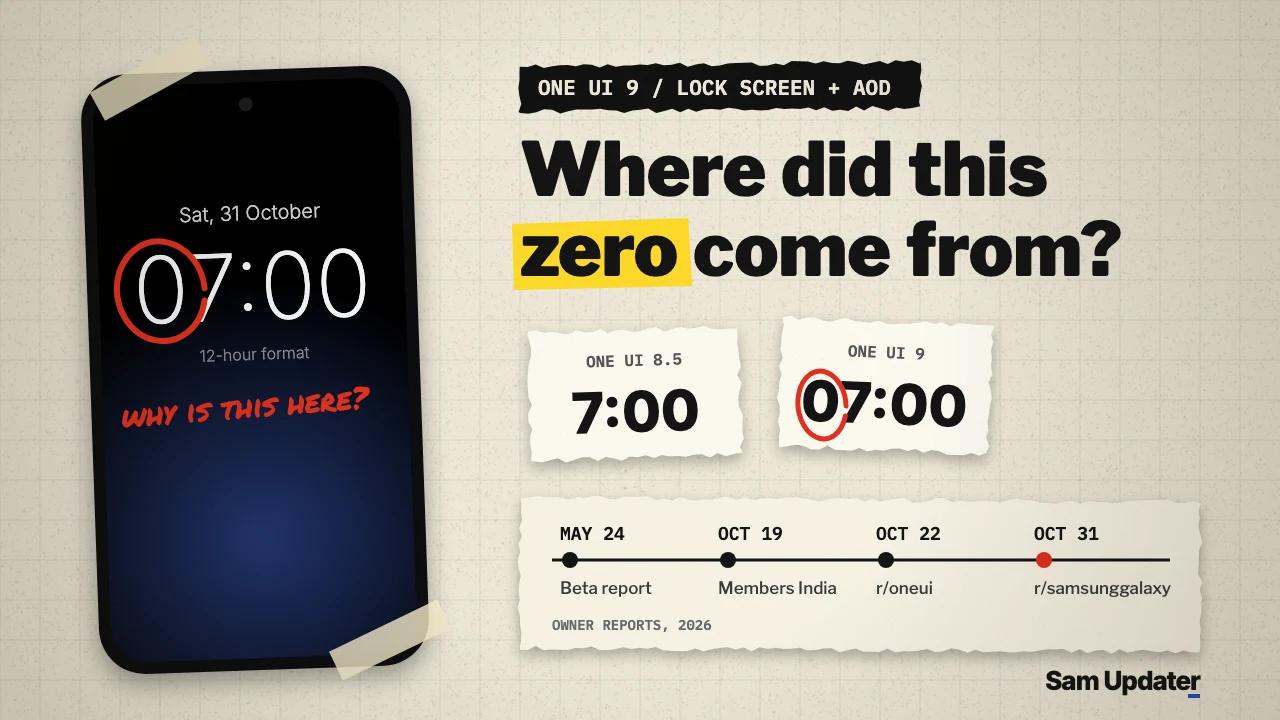
One UI 9 owners are reporting a leading zero on the 12-hour lock screen and Always On Display clock, so 7 PM shows as 07:00. The latest report went up on r/samsunggalaxy on October 31. Samsung hasn’t said whether the zero is a bug or a deliberate change.
The October 31 poster says the AOD clock looked right on One UI 8.5. After One UI 9, a 12-hour time picks up the extra zero, and there’s no AM or PM next to it. They also say getting the old look back took Good Lock plus two more extensions, without naming them. No phone model is mentioned.
This isn’t the first report, and the details don’t all line up. If you see the zero, check your lock screen clock style first, because one owner says only some styles add it.
Leading zero reports since the One UI 9 beta
Owners on Reddit and Samsung Members say the One UI 9 lock screen clock shows single-digit hours with a zero in front, like 05 or 07, even with the 24-hour format turned off. Reports go back to the One UI 9 beta in May 2026. Samsung staff have replied only with requests for logs.
Here’s how the reports stack up by date:
| Date (2026) | Where | What the owner says |
|---|---|---|
| May 24 | Samsung Community US, One UI Beta, S26 board | Leading zero on the lock screen clock in both 12-hour and 24-hour time |
| October 19 | Samsung Members India, Galaxy A board | Lock screen hours show as 05 and 06 instead of 5 and 6, even in 12-hour mode |
| October 22 | r/oneui | The first lock screen clock style has the zero, the fourth style doesn’t, with 24-hour format off |
| October 31 | r/samsunggalaxy | 12-hour AOD clock reads 07:00 at 7 PM, with no AM or PM |
The beta thread also points to reboots. A reply from a Galaxy S26 (SM-S942U1) owner on Xfinity Mobile says they only see the zero right after a reboot. Once the phone fully loads, their AOD and lock screen go back to the clock without it.
Is the leading zero a bug or a design change?
Nobody outside Samsung knows yet. In the beta thread, a US Beta Moderator asked for an error report with system logs. In the India thread, a Samsung Customer Support moderator asked for the log file plus videos and images. Neither reply calls it a bug or says a fix is coming.
Owners are split too. In the October 22 r/oneui thread, one reply thinks it’s simply a change, while the original poster thinks it has to be a mistake, because 03:07 with no AM or PM is hard to read at a glance.
Which clock style shows the leading zero?
This is where the reports clash. The October 22 poster says only the first clock style adds the zero for single-digit hours, while the fourth style doesn’t. But in a September 4 r/oneui thread, the original poster replies that all the clocks have the zero.
So trying a different clock style is a fair first check. It isn’t a guaranteed fix. A reply on the October 31 post also says they changed it in their lock screen settings, but doesn’t say which option.
Your AOD will follow whatever you pick. Samsung’s US AOD support page says that on One UI 6.1, the AOD uses the same clock as the lock screen. That’s why both screens change together.
Check your lock screen and AOD clock settings
Go through these in order and look at the lock screen after each one, so you know which change made the difference.
- Open Settings > Lock screen and AOD > Always On Display, then tap Clock style.
- Pick a different clock style, tap Done, and lock the phone to see both screens.
- Open Settings > General management > Date and time and check that Use 24-hour format is off. Samsung’s US date and time page lists this toggle.
- Restart the phone, wait a few minutes, and check again. That’s the pattern the S26 owner described.
One more thing. A reply in the beta thread suggested uninstalling LockStar, the Good Lock module. The original poster never said whether that helped, and an S24+ owner in the October 22 thread says uninstalling Good Lock did nothing for them. If you don’t use LockStar, skip it.
Send Samsung an error report
Send an error report through Samsung Members, since logs are what Samsung’s staff asked for in both threads.
- Open Samsung Members and tap Support.
- Tap Send feedback and pick the right category.
- Describe the clock, the clock style you use and whether 24-hour format is on, and attach a screenshot or short video.
- Send the report within 3 minutes of seeing the zero, and keep the app open until it says the report was sent.
That 3-minute window comes from the Samsung moderator’s reply in the India thread. If you’re on the beta, the moderator in the US thread points to Samsung Members > One UI Beta Program > Beta Feedback > Error reports instead, with Send system log data turned on.
We rounded up other One UI 9 complaints in our guide to annoying One UI 9 changes, and the app drawer has its own visual glitch that we covered in our One UI 9 app drawer blur guide. To see where your model stands, check our One UI 9 update tracker.
FAQ
Does switching to 24-hour time remove the leading zero?
No. A 24-hour clock shows the zero by design. The reports here come from owners who already have Use 24-hour format turned off, and the beta poster says the zero shows in both modes.
Which Galaxy phones show the leading zero?
The posts name a Galaxy S26 in the beta and an S24+ on One UI 9. Most owners don’t say their model. If you see it, tell us your model, One UI version and clock style in the comments.
Was this guide helpful?
Your answer helps us keep it accurate.

Comments (0)
Comments are moderated, and published only if they are relevant to the topic and add value in a constructive way. If you disagree with something, please be polite and respectful.