
If your Samsung Galaxy says "Your current software version isn't supported. Visit a service center," record the error, check the model and installed software, then see whether Smart Switch offers an update. The message alone doesn't tell you that the phone is fake, rooted or running the wrong firmware. A Galaxy S24 owner's report shows why it's better to gather those details before choosing a fix.
I'll walk you through that check without treating a community suggestion as a confirmed diagnosis. Keep the phone's existing data intact while you find out which update route applies.
Understand the unsupported software message
It establishes that the attempted update check didn't offer a supported update path on that phone. It doesn't identify the reason. Don't turn the wording into a claim that Samsung detected root, that a region code is wrong, or that a particular hardware part has failed.
In the linked Samsung US community discussion, an owner had recently bought a renewed Galaxy S24 and reported the message. A Samsung Care Ambassador suggested trying Smart Switch on a computer, then contacting the carrier or a certified repair center if no update appeared. That role is a community designation; the reply wasn't a service-center diagnosis.
The owner later said Smart Switch didn't offer an update either. The thread provides an example of the error and the suggested next steps, but it doesn't confirm what ultimately caused or fixed that phone's problem.
Record the model, build and exact error
Save the wording from the update screen and the model and software details from Settings. They help Samsung, your carrier or the seller investigate the exact device. Keep the full values, including letters after the model number, rather than shortening everything to a name such as Galaxy S24.
- Open Settings > About phone and note the model number.
- Open Software information and note the One UI version, Android version and build number.
- Record Service provider software version if it appears on that screen.
- Capture the update error and note when it first occurred.
- Write down whether the phone ever updated successfully while you owned it.
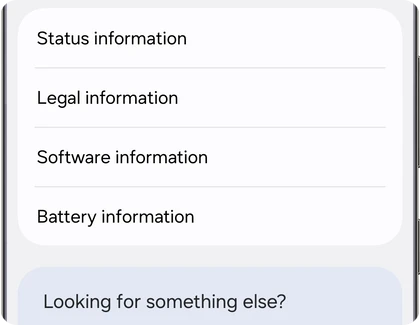
The Care Ambassador discussion and its replies ask the owner to check the model in About phone. Our Samsung build-number guide explains the labels you'll be collecting. You don't need to enter Download mode or change any setting to write them down.
If you share a screenshot publicly, hide the IMEI, serial number, phone number and account information. Give identifying information only to the support provider that needs it.
Does a different CSC prove the firmware is wrong?
No. Don't diagnose an unsupported update from a code you don't recognize or assume every component must have an identical prefix. Record the service-provider software value and let Samsung or the carrier check it against the device. The S24 discussion does not establish a universal rule for matching firmware components.
Our CSC lookup guide can help you locate the value. Finding it is useful; changing it is a separate operation. I would leave the CSC alone while investigating this error rather than introduce another change before support has seen the original details.
The same applies to a refurbished phone. Tell the seller when you bought it and whether updates ever worked. The fact that the reported S24 was renewed doesn't establish that all renewed phones with this message have modified software.
Check the update option in Smart Switch
Use Samsung's desktop application and install an update only if it offers one for the connected device. Samsung's current Levant support instructions cover Windows and Mac, a reliable USB data cable, and the Update option. They also explain that available functions and software depend on the model and version.
- Back up files you cannot replace before attempting the update.
- Install the current Smart Switch application from Samsung's official download page.
- Connect the phone to the computer with a data-capable USB cable.
- Open Smart Switch and allow the phone connection if prompted.
- If Update appears, read its details and follow the prompts.
- Keep the cable connected until Smart Switch confirms completion.
If detection fails, Samsung recommends checking the cable and port, restarting the devices, and updating or reinstalling Smart Switch. Do those connection checks before interpreting an absent Update button as a firmware fault.
What if Smart Switch has no Update button?
No update in Smart Switch does not prove that the phone has non-retail software. Samsung lists several possibilities, including no newer release for the device, a required earlier update, and connection or application problems. The next step depends on which of those applies.
| What happens | What to record or check |
|---|---|
| Smart Switch doesn't detect the phone | Check the cable, port, connection permission and desktop application |
| Phone is detected, but no update appears | Record the model and installed build for Samsung or the carrier |
| Smart Switch offers an update | Back up, then follow the update prompts without disconnecting |
| Both update routes report a problem | Send both exact messages to support or the seller |
Our firmware checker can provide another reference for your model and region. A newer build appearing there still doesn't guarantee that Smart Switch or your carrier can install it on your particular phone at that moment.
Should you factory reset or flash firmware to clear the error?
I would not use this message alone as a reason to erase the phone or flash a package. Neither linked source confirms a universal fix. Give support the original evidence first, and ask what action they recommend for the exact model and installed software.
If a repair involves a reset, understand the data loss before agreeing. Samsung's UK reset guidance explains that personal data is removed and that a button reset can require the previously associated Google account. A backup and account access matter before any such step.
Frequently asked questions
Does this error prove my Samsung phone is fake?
No. The message is not an authenticity check. Ask Samsung or the seller to verify the model and software rather than relying on the appearance of an error screen.
Should I wait for the next update instead?
Ask Samsung or your carrier whether an update is available for the model and installed software you recorded. Don't assume a future release will clear an unresolved error, especially if the device has never updated while you owned it.
What should I take to a repair appointment?
Bring proof of purchase and the error screenshots, plus a note of what happened in Smart Switch. Tell the technician whether your data is backed up before authorizing work. If you'd like help reading the screen first, share your model and the exact message, without personal identifiers.
Was this guide helpful?
Your answer helps us keep it accurate.

Comments (0)
Comments are moderated, and published only if they are relevant to the topic and add value in a constructive way. If you disagree with something, please be polite and respectful.