
If the Samsung Now Bar isn't showing music, check the supported apps in Settings > Lock screen and AOD > Now bar, then check lock screen and app notification permissions. Samsung's Malaysia support guide explains that enabling Now bar alone isn't enough when those notification controls are off. Start playback while testing so you can separate missing controls from an app that has stopped playing.
I'll check the display settings first, then background playback. If your controls are present but their position changed, our guide to One UI changes covers that separate issue.
Separate playback problems from missing controls
Start a track in the app, lock the phone and wake the screen. Note whether the sound continues. If it does, focus first on the Now bar and notification settings. If the sound stops too, include the app's background-playback settings in the investigation rather than assume the lock screen alone is broken.
| Test result | Where I would look next |
|---|---|
| Audio continues, but no lock screen controls appear | Supported Now bar apps and lock screen notification permissions |
| Playback stops when the screen locks | The app's playback behavior and background restrictions |
| One supported app works and another doesn't | The affected app's notification and battery settings |
| No supported activity appears | The global Now bar settings, then a Samsung Members error report |
This is a test order, not a diagnosis from a single symptom. Keep the same track and app while changing one setting, then repeat the lock-and-wake test. Otherwise, a different track, app or connection can make it hard to tell what helped.
Choose supported Now Bar apps
Open Settings > Lock screen and AOD > Now bar and review the apps and activities offered on your device. Samsung's UAE support page confirms that this menu shows available supported apps. Don't assume every audio app has its own switch or that every model has an identical list.
- Open Settings and select Lock screen and AOD.
- Open Now bar.
- Look at the live-information or live-notification options shown on your software.
- Enable the supported music or app option you want to display.
- Start playback again, lock the phone and wake the screen.
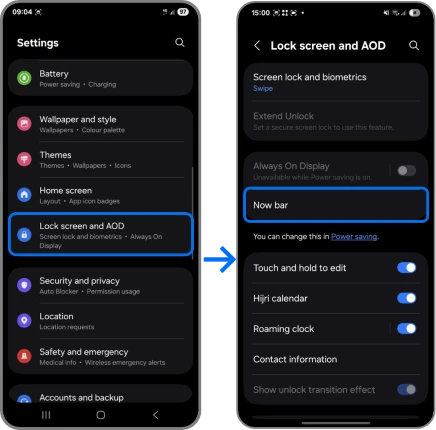
Samsung's Malaysia guide shows See all under Live notifications. Use the wording displayed on your version. If there is no Now bar menu, check support for the exact model and software instead of concluding from that absence alone that the phone runs an older Android version.
Review notifications for the music app
Check the phone's lock screen notifications and the affected app's permissions. Samsung's Malaysia instructions cover both levels, including live notifications for supported apps. This is the missing check if you enabled Now bar but left notification display restricted somewhere else.
- Open Settings > Notifications > Lock screen and review whether notifications can be shown.
- Return to Notifications and open App notifications.
- Select the affected supported app and check Allow notifications.
- Review its lock screen and live-notification options if offered.
- If notification categories are enabled, check that the relevant categories aren't turned off.
Notification content and notification visibility are also different. If the bar shows the app name but hides details, review the content-visibility choices described on Samsung's page. Choose the privacy level you want on the lock screen; you don't have to expose all message content just to investigate music controls.
After each change, generate fresh activity by starting playback again. That gives you a clearer test than staring at an old paused session and assuming the screen must update immediately.
What if music stops when the phone locks?
Check the music app's background restrictions. Samsung's US audio troubleshooting guide says audio can stop when an app isn't allowed to run in the background. It documents the app's Battery options and removing it from Sleeping apps or Deep sleeping apps.
- Go to Settings > Apps and select the music app.
- Open Battery and review its current restriction.
- If appropriate for that app, test Unrestricted and check whether playback continues.
- Review Settings > Battery > Background usage limits and remove the app from a sleeping list if necessary.
- Repeat the same playback test before changing other apps.
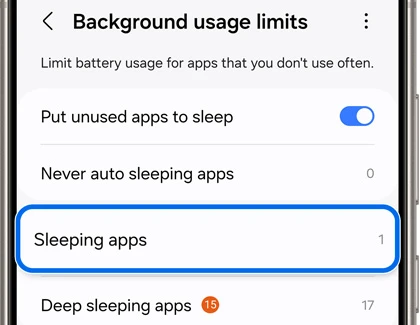
Samsung notes that Unrestricted can increase battery use. Apply it to the affected app for this check, not to everything installed. If it doesn't change the result, review the app's own playback requirements and undo settings you no longer need.
How do you tell whether one music app is the problem?
Compare the affected app with another supported activity shown in your Now bar settings. Keep the comparison narrow: a working control in one app shows that the bar can display that activity, but it doesn't prove another app's notifications, background behavior or account features are configured correctly.
Don't assume Samsung Music is installed on every phone or that every streaming service behaves identically when the screen turns off. Use an app you already have, check its own support information if playback stops, and note its version when reporting the problem.
Update the app and collect an error report
If the settings checks don't help, Samsung's audio guide recommends checking device and app updates and restarting. Use the update entry your software shows under Settings > Software update, which may say Check for updates or Download and install. Update the affected app through its store too.
A Samsung Members India discussion from April 2025 documents one Galaxy S24 Ultra owner whose Now Bar remained absent after enabling its settings. The moderator gave the Now bar menu path and requested a log-backed error report if the issue persisted. Another member suggested a Voice Recorder test; that suggestion isn't a confirmed general fix.
When reporting, describe whether audio continues, which supported app fails and which notification settings you checked. Our post-update performance guide is relevant if the phone is also slow, but a missing Now Bar by itself isn't a reason to work through unrelated reset steps.
Frequently asked questions
Does pausing music prove the Now Bar is broken?
No. Repeat the check with playback active before diagnosing a missing control. The sources linked here don't establish a universal period that every app keeps a paused session visible.
Do all Galaxy phones support the same Now bar apps?
Use the supported-app list on your own phone. Samsung's support pages point to that list rather than guarantee identical availability across every Galaxy and software release.
Should I reset my phone if the Now Bar is missing?
Start with the display, notification and playback checks above. If the problem remains, send Samsung an error report with the model, software version and affected app. You can share those details in the comments too, without including your account information.
Was this guide helpful?
Your answer helps us keep it accurate.
Comments (0)
Comments are moderated, and published only if they are relevant to the topic and add value in a constructive way. If you disagree with something, please be polite and respectful.