
If Samsung Wi-Fi Calling is missing after an update, check both Settings > Connections and the Phone app's settings before changing anything. Samsung's US support page says availability depends on the device and carrier. A missing Quick panel button alone doesn't establish that your line has lost Wi-Fi Calling.
I'll start with the places Samsung documents, then the connection and carrier checks. The timing of an update is useful information for support, but it doesn't identify the cause on its own.
Separate a missing button from missing support
Open Settings > Connections and look for Wi-Fi Calling. If it isn't there, check the Phone app path below. Menu locations vary, so don't judge availability solely by where the switch sat before an update.
| What you see | What it means | Fix |
|---|---|---|
| Wi-Fi Calling is in Settings, but not in the Quick panel | The settings entry is still available | Add the button back in Quick panel edit mode |
| Not in Settings > Connections, but in the Phone app settings | The setting moved for your carrier or model | Use it from the Phone app |
| Missing everywhere | Device or carrier support needs checking | Carrier checks below |
| The switch is there but grayed out | Check Wi-Fi, active service and carrier-specific requirements | Device checks below |
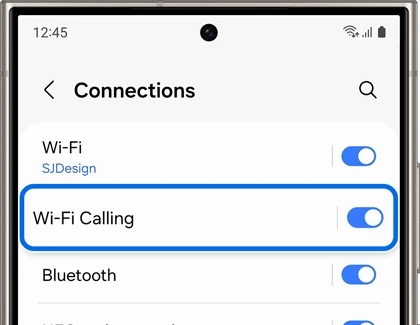
Samsung's Wi-Fi Calling support page uses the same path and notes that the feature may not be available on all carriers or devices.
Restore the Wi-Fi Calling shortcut
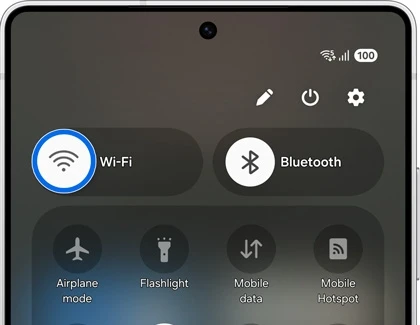
If your phone offers a Wi-Fi Calling tile, you can use it as a shortcut. Samsung's US page says the Quick panel option is available on some phones. Check the available tiles in your panel's edit view; an absent tile doesn't replace checking the settings menus.
- Open the full Quick panel. Samsung documents a two-finger swipe; the gesture and layout may differ on your software.
- Use the panel's edit control if one is available.
- Look for Wi-Fi Calling in the available buttons.
- If the tile is offered, add it and save the panel layout.
Samsung says the Quick panel button only exists on some phones. If you don't see it in edit mode, use the switch in Settings > Connections instead. It does exactly the same thing.
Where else can the Wi-Fi Calling setting be?
On some carriers and models, it sits in the Phone app instead. Samsung's Singapore support page describes this path: open the Phone app, tap the three dots, tap Settings, then turn on Wi-Fi Calling.
For a phone using more than one line, note which SIM or eSIM you're trying to use when contacting the carrier. Samsung requires active service for the feature. You can also search Settings for Wi-Fi Calling, but an empty search result by itself doesn't explain why the option is unavailable.
Why is the switch grayed out?
Check the requirements before treating a disabled switch as an update bug. Samsung's US page calls for a working Wi-Fi connection and active SIM or eSIM service. It specifically mentions VoLTE on AT&T phones; that is a carrier-specific instruction, not a setting every Galaxy owner should expect to see.
- Swipe down and make sure Wi-Fi is on and connected to a network.
- Check that the SIM is inserted, or the eSIM is active, in Settings > Connections > SIM manager.
- If you use AT&T, check its VoLTE requirement with the carrier; don't assume every phone exposes a VoLTE switch.
- Restart the phone, then try the switch again.
If a popup asks for an emergency address when you turn it on, fill it in. Some carriers won't enable Wi-Fi Calling until your emergency address is saved.
Compare the software and carrier details after an update
Compare what changed before assigning a cause. Samsung's support pages establish device and carrier dependencies, but they don't say every missing switch after an update is a provisioning failure. Record the update timing and check whether you changed the SIM, carrier or phone at the same time.
- Note whether Wi-Fi Calling worked on this exact phone and line before.
- Record the installed software version for the carrier.
- Tell support if the phone was imported or bought from a different carrier.
- Ask whether Wi-Fi Calling is supported and enabled for the line you use.
Our Samsung CSC guide helps you locate the service-provider software information if support asks for it. A code you don't recognize isn't a reason to change CSC or flash firmware while diagnosing a missing call setting.
When should you contact the carrier or reset network settings?
Samsung directs you to the carrier if the documented connection checks don't restore access. Ask the carrier to confirm support for your exact device and active line before a reset. Resetting local settings cannot make an unsupported device or plan eligible for a carrier feature.
Have the model, software version, error wording and whether Wi-Fi Calling ever worked ready. Share an IMEI privately with carrier support only if requested, rather than including it in a public troubleshooting screenshot.
If a network reset is recommended, read the confirmation first. Our mobile-network reset guide explains the separate options. Samsung's US reset guide also distinguishes mobile-network settings from Wi-Fi and Bluetooth settings.
- Open Settings > General management > Reset.
- Find Reset mobile network settings if your software offers it separately.
- Read the warning and confirm only the reset you intend.
- Afterward, check the Wi-Fi Calling settings again with Wi-Fi connected and the line active.
If the only option shown combines Wi-Fi and Bluetooth with mobile networks, don't assume it will preserve saved wireless connections. Stop and confirm the scope before proceeding. Keep the result of the reset for the carrier; it is useful whether the option returns or stays missing.
Frequently asked questions
Does every Samsung phone support Wi-Fi Calling?
No universal guarantee applies. Samsung says the feature may not be available on every device or carrier. Check your model and active service with the carrier rather than rely only on the Galaxy series name or installed One UI version.
Will Wi-Fi Calling come back on its own after an update?
There is no fixed waiting period in the Samsung pages linked here. After checking the documented menus and connection requirements, ask your carrier whether a change is needed on your line or whether it is investigating an issue with your software version.
Can I turn on Wi-Fi Calling on an imported Samsung phone?
Ask the carrier whether it supports the exact imported model, not just the product family. Samsung's Singapore page notes that country and carrier availability differ. Don't change region software based only on a missing switch.
Does resetting network settings delete anything?
Reset mobile network settings only resets carrier and mobile data settings. Your files, apps and accounts stay as they are. A full network settings reset also removes saved Wi-Fi networks and Bluetooth pairings.
Was this guide helpful?
Your answer helps us keep it accurate.
Comments (0)
Comments are moderated, and published only if they are relevant to the topic and add value in a constructive way. If you disagree with something, please be polite and respectful.