
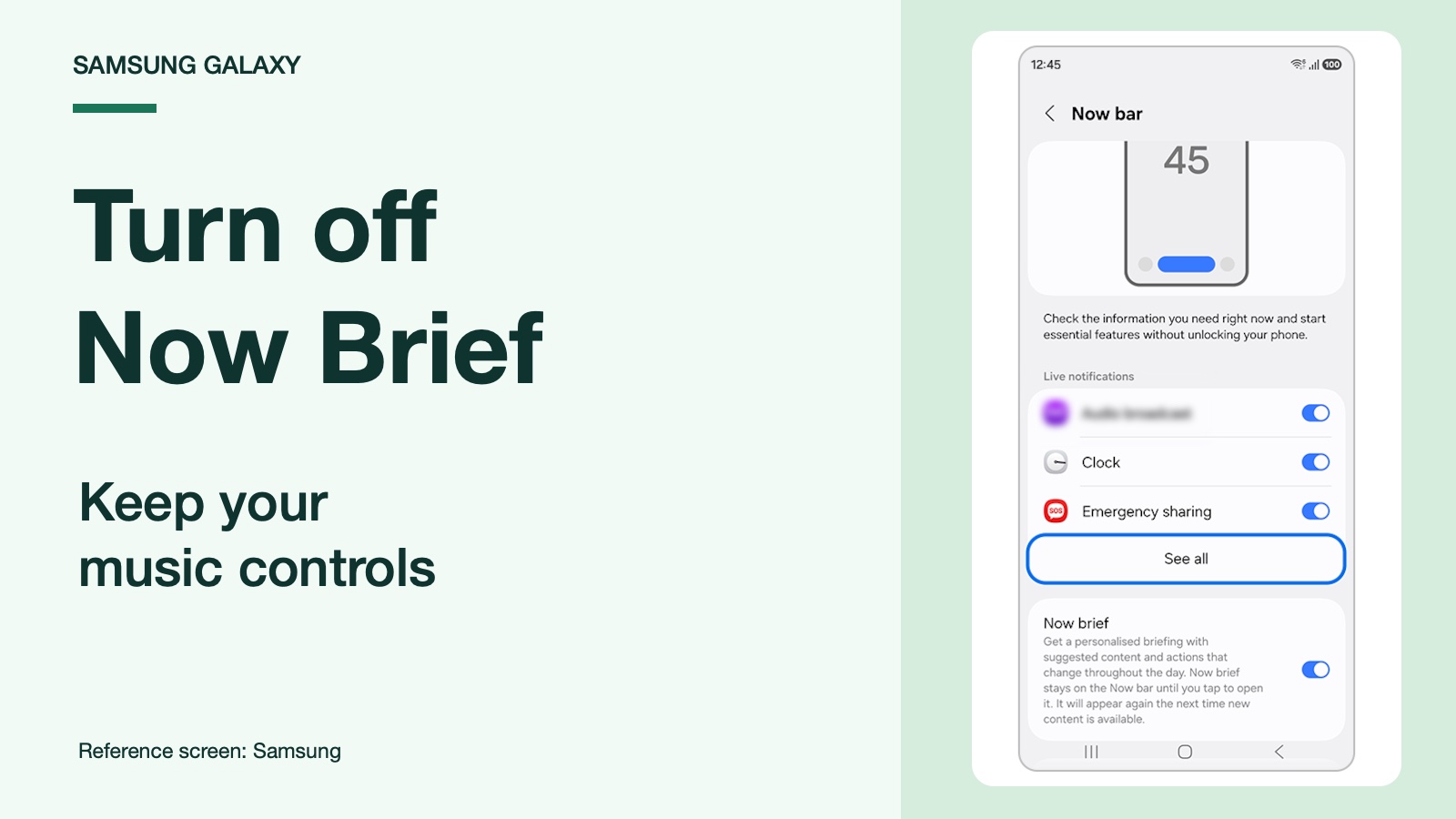
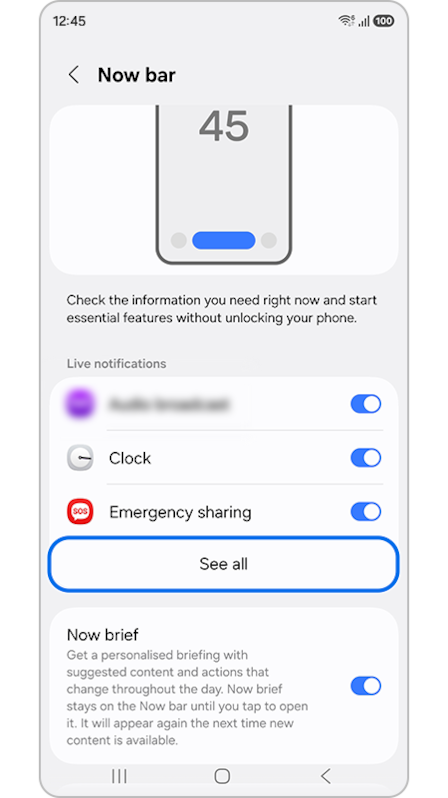
To turn off Now Brief on your Samsung lock screen, open Settings > Lock screen and AOD > Now bar and switch off Now brief. Leave Media player enabled if you want to keep music controls. Samsung lists the briefing and other activities separately in its UK Now bar instructions.
The confusing part is that Now Brief also has its own content settings and Home screen widget. I’ll walk you through the lock-screen change first, then the widget, so you can remove the part you dislike without switching off everything around it.
Turn off Now Brief on the lock screen
Use the Now bar menu for this. Changing which topics appear inside a briefing is a different job from hiding its lock-screen entry.
- Open Settings on your Galaxy.
- Select Lock screen and AOD. Some software uses Lock screen.
- Open Now bar.
- Find Now brief and turn its switch off.
- Return to the lock screen and check whether the briefing entry has disappeared.
This is also the answer in an April 15, 2026 Galaxy S25 discussion. The original poster had already turned off the briefing’s content options and dismissed the card, but it kept getting in the way of changing music.
A community contributor pointed them to the separate Now bar switch. That detail is useful if you’ve been returning to the same content-selection screen and wondering why nothing changes on the lock screen.
Keep the music controls you actually use
Samsung’s US setup guide identifies Media player as a separate Now bar option. Leave that switch on. You can also leave your other wanted activities enabled instead of clearing every entry in the menu.
I would check the result with a song already playing. Open your music app, start playback, lock the phone, then wake the screen. Look for the playback controls and try pausing the track from there.
If you see a different ongoing activity first, swipe through the Now bar cards. Samsung documents that gesture in the same setup guide. A timer appearing first doesn’t mean the music control has been deleted.
Another setting can sound like the answer here: Expand Now brief without unlocking. Samsung describes it as a way to open the full briefing from the locked screen. Changing that preference won’t do the same job as switching off the Now brief entry in the Now bar menu.
Why can Now Brief still appear on the Home screen?
The Home screen widget is a separate way to open Now Brief. Hiding its Now bar entry doesn’t remove that widget. Samsung documents access through the lock screen, the Home screen widget and the Edge panel, so first identify which of those places still shows the item you want gone.
For a normal Home screen widget, follow Samsung’s widget-removal instructions:
- Go to the Home screen page containing the Now Brief widget.
- Touch and hold the widget itself.
- Tap Remove.
- Check the other Home screen pages if you added another copy.
If Now Brief is inside a widget stack, touch and hold the stack and choose Edit stack. Find its card and use the minus control for that widget. Choose carefully here: Remove all applies to the whole stack, which may contain other widgets you want to keep.
A search bar is a different Home screen element. If that’s the thing you’re trying to remove, our One UI 9 search bar guide covers its own settings.
When the Now brief switch is missing
In the Galaxy S25 discussion linked above, the original poster said the switch appeared after restarting the phone. That is one owner’s follow-up, so I’d treat a restart as a reasonable first check rather than a guaranteed repair.
Restart once, then return directly to Lock screen and AOD > Now bar. If the entry is still absent, note the labels you actually see. A screenshot showing the entire Now bar settings page is more useful than a close-up of the briefing card.
Samsung’s UK guide also explains that the Now bar relies on lock-screen notifications and the relevant app notification permissions. If your music controls vanished after you changed several notification settings, review those changes before blaming the Now Brief switch.
For other interface changes, our One UI 9 settings guide covers separate controls. For example, the Now bar’s position is a different complaint from an unwanted briefing appearing inside it. Use the guide for the change you actually see.
FAQ
Does this uninstall Now Brief?
No. These steps hide its lock-screen entry and remove a Home screen widget. Samsung still documents other ways to open the feature, including the Edge panel. Treat this as a display preference, rather than a claim that the underlying service has been removed from the phone.
What if I only want fewer topics in the briefing?
Open a briefing, tap its Settings icon and look for Content to include. Samsung’s US guide documents category selection there. Use that route when you want to keep the briefing but change what it contains; use the Now bar switch when the lock-screen entry itself is the problem.
Which details should I share if the menu looks different?
Tell me your Galaxy model, One UI version, and whether the item appears on the lock screen, Home screen or Edge panel. Include the setting labels you can see and whether music controls still work. That gives us a specific screen to compare.
Was this guide helpful?
Your answer helps us keep it accurate.
Comments (0)
Comments are moderated, and published only if they are relevant to the topic and add value in a constructive way. If you disagree with something, please be polite and respectful.