
Verizon has listed One UI 9 with Android 17 for the Samsung Galaxy S24, Galaxy S24+, and Galaxy S24 Ultra in the US, with an October 20, 2026 release date. Its Galaxy A37 5G support page also lists the upgrade, dated October 19.
I checked the carrier’s release notes rather than treating this as another global rollout report. There’s one detail to notice: these builds carry the September 2026 security patch, even though they’re arriving in October.
Which Verizon Galaxy phones are getting One UI 9?
Verizon’s Galaxy S24, Galaxy S24+, and Galaxy S24 Ultra pages list System Update 38 with Android 17 and One UI 9.0. The Galaxy A37 5G page lists the same OS and One UI versions under System Update 7. The table below links each build directly to its carrier release notes.
| Phone | Software version | Release date | Security patch |
|---|---|---|---|
| Galaxy S24 | CP2A.260605.016.S921USQU6EZIF | October 20, 2026 | September 2026 |
| Galaxy S24+ | CP2A.260605.016.S926USQU6EZIF | October 20, 2026 | September 2026 |
| Galaxy S24 Ultra | CP2A.260605.016.S928USQU6EZIF | October 20, 2026 | September 2026 |
| Galaxy A37 5G | CP2A.260605.016.A376USQU5BZI6 | October 19, 2026 | September 2026 |
This is a carrier-specific confirmation. It doesn’t mean every unlocked Galaxy or every carrier has the same build available today. You can follow the wider rollout in my One UI 9 tracker.
What’s new on the Galaxy S24 series?
Verizon highlights My FanCam, Now Brief, Call Brief, and user-experience improvements in the Galaxy S24 series release notes. My FanCam can follow a selected person in a recorded video, while Now Brief gets cards you can create and edit for your daily summaries.
For My FanCam, the carrier gives this path: Gallery > select a video > Galaxy AI > My FanCam. I’ve linked the Galaxy S24 Ultra release notes so you can compare the feature description with what’s on your phone.
The Galaxy A37 5G changelog is shorter. It confirms Android 17 and One UI 9.0 but doesn’t list the same Galaxy AI additions, so I wouldn’t promise those S24 features on the A37 from this changelog alone.
How do you check for the Verizon One UI 9 update?
On your Galaxy, open Settings > Software update > Download and install. Some carrier software uses System updates or Check for updates instead. Connect to Wi-Fi or a strong Verizon connection and charge the phone before installing. Verizon includes connection and battery guidance on each linked update page.
- Open Settings.
- Tap Software update or System updates.
- Choose Download and install or Check for updates.
- Read the update details and follow the installation prompts if the upgrade is offered.
- After restarting, check Settings > About phone > Software information for the installed version.
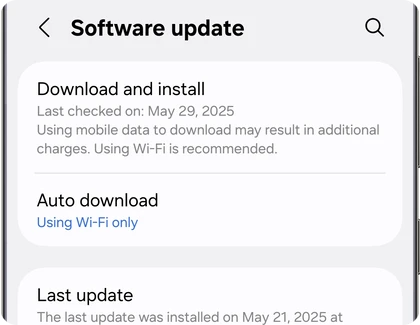
If you’re comparing dates after installing, my security patch level guide explains where to find the patch date. Don’t confuse the October release date with the September patch included in these builds.
Has the update reached your Verizon Galaxy yet? Leave your model and build number below, and mention whether you’re using a Verizon model or an unlocked phone.
Was this guide helpful?
Your answer helps us keep it accurate.

Comments (0)
Comments are moderated, and published only if they are relevant to the topic and add value in a constructive way. If you disagree with something, please be polite and respectful.