
Samsung started rolling out the stable One UI 9.0 update, based on Android 17, to the Galaxy A55, Galaxy A35, Galaxy A17 5G and both versions of the Galaxy A16 on October 21, 2026. The first builds are live in South Korea, and other countries usually follow within days.
That’s a big batch of Samsung’s best-selling midrange and budget phones moving off the beta in one go. Here’s what we know about the builds, what’s new and when you can expect it outside Korea.
Key points: One UI 9.0 stable is out for the Galaxy A55, A35, A17 5G, A16 and A16 5G in South Korea. The One UI 9 beta has ended on these phones. There’s no confirmed date yet for India, Europe or the US.
Which Galaxy A phones are getting One UI 9 stable?
The Galaxy A55, Galaxy A35, Galaxy A17 5G, Galaxy A16 and Galaxy A16 5G are getting stable One UI 9.0 in South Korea first. SamMobile and Android Headlines reported the rollout on October 21. Builds for the Galaxy A07 and a Korean Galaxy M16 5G model have also shown up.
Here are the firmware versions reported so far. You can match these with Settings > About phone > Software information > Baseband version after installing.
| Phone | One UI 9 build | First region |
|---|---|---|
| Galaxy A55 | A556SKSUBEZJ1 | South Korea |
| Galaxy A35 | A356NKSUAEZJ2 | South Korea |
| Galaxy A17 5G | A176LKSU4CZJ5 | South Korea |
| Galaxy A16 (LTE) | A165NKSU9EZJ3 | South Korea |
| Galaxy A16 5G | A166LKSU8DZJ5 | South Korea |
| Galaxy M16 5G (Korea) | M166SKSU8DZJ5 | South Korea |
| Galaxy A07 | A075FXXU7DZJ5 | Not confirmed |
The A16 builds come from SamMobile’s A16 report. The A35, A07 and M16 builds were listed by Sammy Fans. The A07 build carries an XXU code, which Samsung uses for its open market firmware, so the region for that one isn’t clear yet.
Is the One UI 9 beta over on the Galaxy A55 and A16?
Yes. Samsung ran three One UI 9 beta builds on the Galaxy A55 and Galaxy A16 before releasing the stable version, and the beta program has now closed. If you were in the beta in Korea, the stable build should arrive as a regular update, and you won’t need to leave the program or reset your phone.
I covered the last beta for the A16 in my post on One UI 9 Beta 3 for the Galaxy A16 5G. That was the final beta before this stable release, so if you skipped the beta, you get all of those fixes in one update.
According to Sammy Fans, the Galaxy A55 and A35 stable builds reached Korean beta testers first, with a wider rollout for everyone else in Korea following.
What’s new in One UI 9 for the Galaxy A55, A35, A17 and A16?
The changelog covers a refreshed look for some UI elements, more Quick Panel customization, Samsung DeX and Samsung Notes upgrades, accessibility changes and a new location privacy indicator. Feature support depends on hardware, so the Galaxy A16 and A17 may not get everything the Galaxy A55 gets.
The location privacy indicator is the one I’d look at first. It shows when an app is using your location, much like the camera and mic dots you already see in the corner of the screen.
What about Quick Share with AirDrop support? Sammy Fans says that feature debuted on the Galaxy A56 and A57. Samsung hasn’t confirmed it for the A55, A35, A17 or A16 yet, so check Quick Share on your phone after you install the update before you count on it.
The security patch level for these Korean builds hasn’t been confirmed either. I’ll add it here once the release notes show up.
When will One UI 9 reach India, Europe and the US?
Samsung hasn’t announced dates for markets outside South Korea. SamMobile and Android Headlines expect other countries over the next few days. Samsung usually releases One UI updates in Korea first and then moves them to Europe, India and the US, with carrier phones often coming in last.
We saw that pattern last week. The Galaxy A56 and A36 went from Korea to a wider rollout within days, as I explained in my post on the Galaxy A56 and A36 One UI 9 update.
I’ll update each phone in our One UI 9 update tracker as new regions and builds show up.
How do you check for the One UI 9 update on a Galaxy A phone?
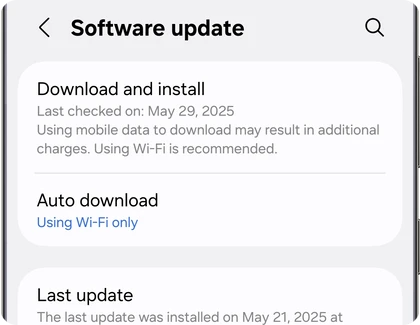
Go to Settings > Software update > Download and install. If One UI 9 is ready for your Galaxy A55, A35, A17 or A16, you’ll see the Android 17 update with its size and changelog. Connect to Wi-Fi and charge your phone to at least 50% before you install.
- Open Settings on your Galaxy phone.
- Scroll down and tap Software update.
- Tap Download and install.
- If One UI 9 shows up, tap Download.
- Tap Install now when the download finishes.
Major updates can take a while to settle in. If your battery drains faster for the first couple of days, that’s normal while the phone optimizes apps in the background. Our One UI 9 battery drain fixes can help if it doesn’t calm down.
FAQ
Is One UI 9 available for the Galaxy A55 in India?
Not yet. As of October 22, 2026, the stable Galaxy A55 build A556SKSUBEZJ1 is limited to South Korea. Indian units use a different model number (SM-A556E), so watch for a build that starts with A556E in the coming days.
Does the Galaxy A16 LTE get One UI 9 too?
Yes. Both the Galaxy A16 LTE (build A165NKSU9EZJ3) and the Galaxy A16 5G (build A166LKSU8DZJ5) are getting stable One UI 9.0 in South Korea.
Should I install One UI 9 right away?
If your phone works well, waiting a week to read other owners’ reports is a safe choice. If you do install, back up your phone first, and keep Wi-Fi and enough charge available. If you’d rather choose when it installs, here’s how to turn off automatic updates on a Samsung Galaxy.
Will the Galaxy A56 and A36 get the same build?
No. The Galaxy A56 and A36 got One UI 9 earlier with their own builds. Each phone gets firmware made for its model number, so check the table above for the build that matches your phone.
Was this guide helpful?
Your answer helps us keep it accurate.


Comments (0)
Comments are moderated, and published only if they are relevant to the topic and add value in a constructive way. If you disagree with something, please be polite and respectful.