
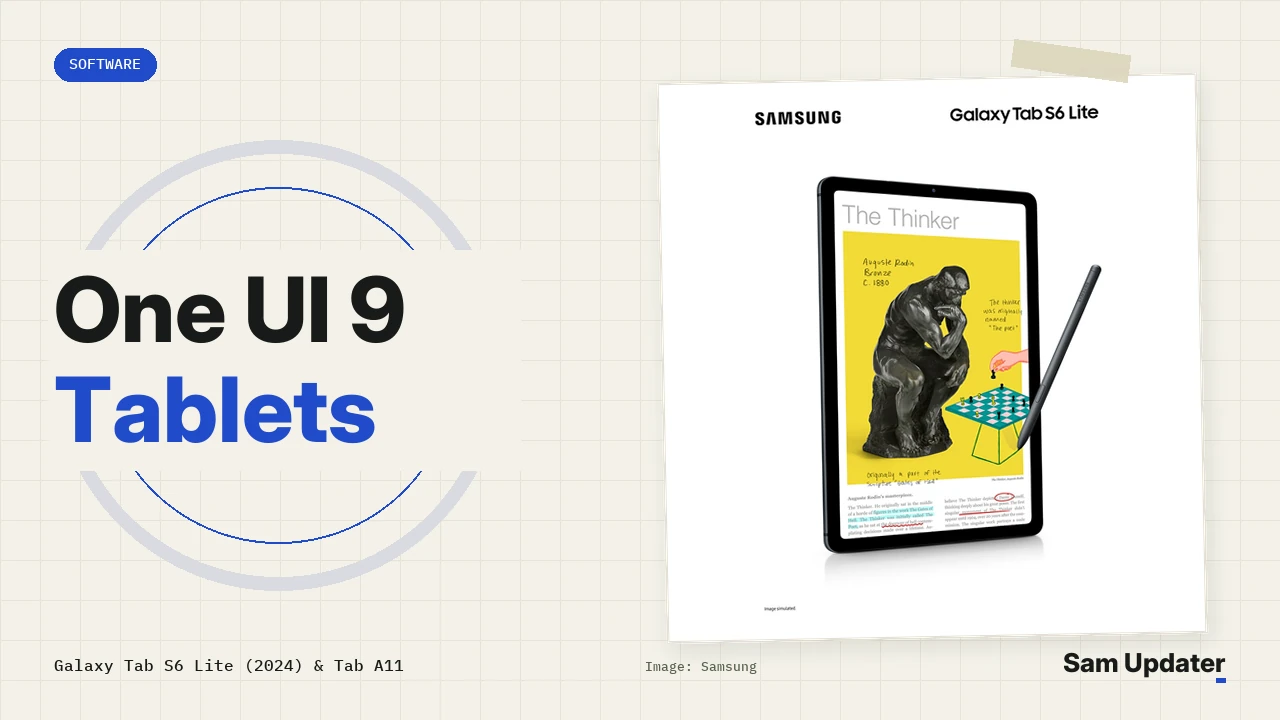
Samsung has started rolling out Android 17 with One UI 9 to the Galaxy Tab S6 Lite (2024) LTE in the Philippines and the Galaxy Tab A11 LTE in South Korea. Both builds carry the November 5, 2026 security patch. Check for your download under Settings > Software update > Download and install.
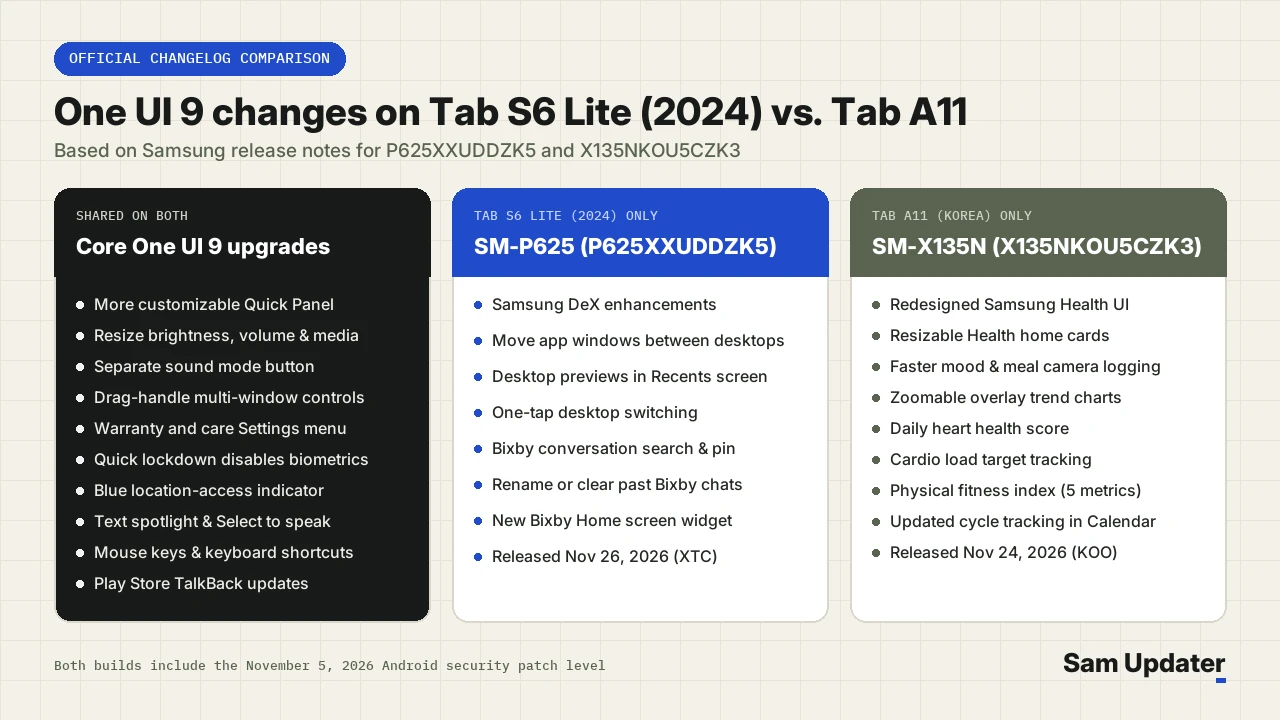
Our November 26 check of Samsung’s release records shows build P625XXUDDZK5 live for the Galaxy Tab S6 Lite (2024) LTE (SM-P625, CSC XTC) with a November 26 date. Korea’s Galaxy Tab A11 LTE (SM-X135N, CSC KOO) carries build X135NKOU5CZK3, dated November 24.
These two tablet builds follow right behind the Galaxy Tab A11+ One UI 9 update we covered earlier this month.
Verified Galaxy Tab S6 Lite (2024) and Tab A11 firmware status
Major Android upgrades roll out one variant and region at a time. Your exact model code and CSC decide when the prompt shows up.
Official Galaxy Tab S6 Lite (2024) SM-P625 release notes confirm the jump from P625XXSDCZI3 to P625XXUDDZK5 in the Philippines. In Korea, the Galaxy Tab A11 SM-X135N changelog confirms the move from X135NKOS5BZI3 to X135NKOU5CZK3.
Across 39 regional Samsung release pages we checked today, every other Wi-Fi and LTE variant of both tablets still sits on Android 16. Here is how each model and CSC lines up right now.
| Tablet model | Model / CSC checked | Latest verified build | Android / One UI | Release date | Security patch |
|---|---|---|---|---|---|
| Galaxy Tab S6 Lite (2024) LTE | SM-P625 / XTC (Philippines) | P625XXUDDZK5 | Android 17 (One UI 9) | 2026-11-26 | 2026-11-05 |
| Galaxy Tab S6 Lite (2024) LTE | SM-P625 / THL, XME, XXV, XSA | P625XXSDCZI3 | Android 16 | 2026-09-28 | 2026-09-05 |
| Galaxy Tab S6 Lite (2024) LTE | SM-P625 / EUX, TUR, XSG, KSA, ZTO | P625XXSDCZI3 | Android 16 | 2026-10-01 | 2026-09-05 |
| Galaxy Tab S6 Lite (2024) Wi-Fi | SM-P620 / EUX, TUR, XSG, ZTO, XID | P620XXSECZI3 | Android 16 | 2026-10-01 | 2026-09-05 |
| Galaxy Tab S6 Lite (2024) Wi-Fi | SM-P620 / XAR (US), XAC (Canada) | P620XXSECZI3 | Android 16 | 2026-10-05 | 2026-09-05 |
| Galaxy Tab A11 LTE (Korea) | SM-X135N / KOO (South Korea) | X135NKOU5CZK3 | Android 17 (One UI 9) | 2026-11-24 | 2026-11-05 |
| Galaxy Tab A11 LTE (India / South Asia) | SM-X135G / INS, NPL, SLK | X135GDXS5BZI4 | Android 16 | 2026-09-28 | 2026-08-05 |
| Galaxy Tab A11 LTE (Southeast Asia / UAE) | SM-X135G / XTC, THL, XME, XSG | X135GDXS5BZI3 | Android 16 | 2026-09-28 | 2026-08-05 |
| Galaxy Tab A11 LTE & Wi-Fi (Europe / Global) | SM-X135F, SM-X130 / EUX, SER, TUR | X135FXXS5BZI3 / X130XXS5BZI3 | Android 16 | 2026-09-28 | 2026-08-05 |
What is new in One UI 9 for both tablets?
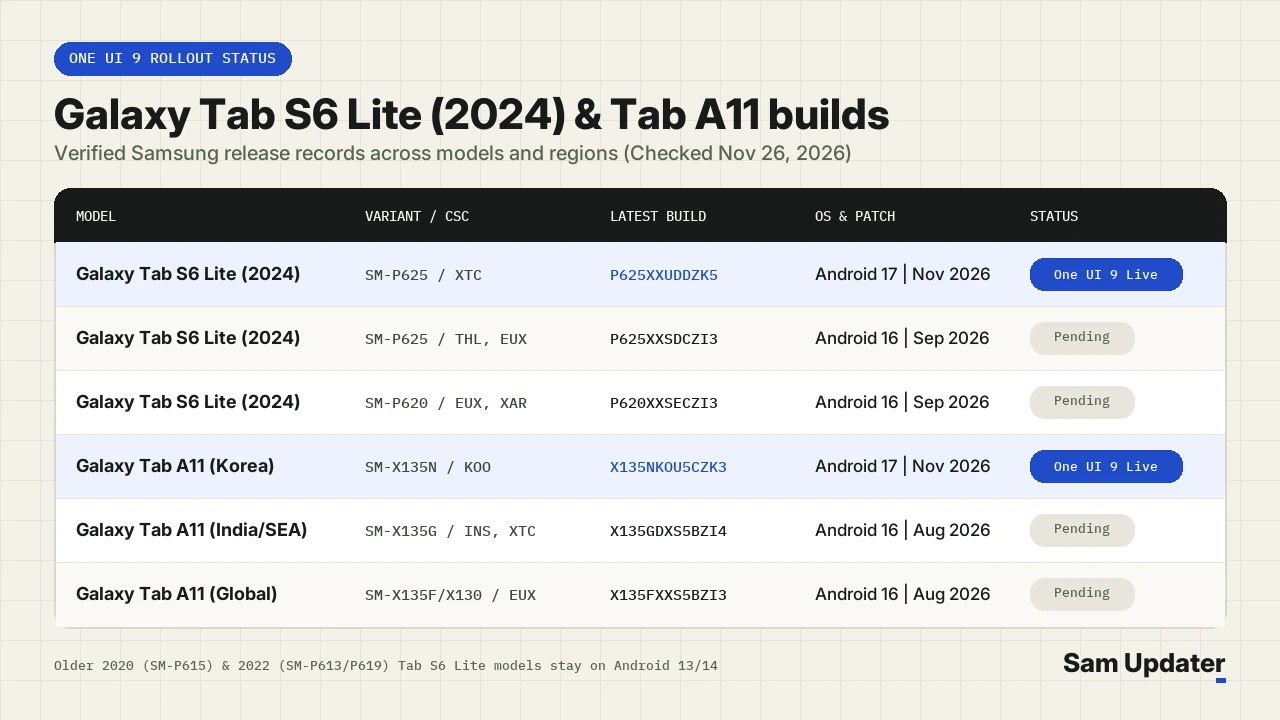
Both tablets get core One UI 9 upgrades: a more customizable Quick Panel, drag-handle multi-window controls, quick lockdown, Warranty and care, a blue location indicator, and new Accessibility tools. Their extras differ, though. Galaxy Tab S6 Lite (2024) adds Samsung DeX and Bixby upgrades, while Galaxy Tab A11 highlights a redesigned Samsung Health app.
You can now resize the brightness slider, volume slider, and media player inside the Quick Panel. Detaching the sound mode button from the volume bar is also supported. Holding an app’s top handle lets you pull it into a pop-up window or drag it to a screen edge for split view.
Security gets two quick additions. Holding Volume down and the Side button together, or tapping Power in the Quick Panel, triggers quick lockdown and blocks biometric unlocks until you enter your PIN. A blue indicator also appears at the top of the screen when an app checks your location, and Settings adds a Warranty and care menu.
Accessibility adds Text spotlight for enlarging selected on-screen text and physical keyboard shortcuts. Mouse keys now include speed, acceleration, and number-pad controls. Select to speak reads items aloud without full TalkBack, Replace swipe with single tap moves under Dexterity and interaction, and TalkBack now updates through Google Play.
Where the changelogs split matters for daily work. Galaxy Tab S6 Lite (2024) adds Samsung DeX upgrades to move windows between desktops from the top menu and preview desktops at the top of Recents. Bixby also picks up conversation search, pinning, renaming, bulk delete, and a Home screen widget.
Korea’s Galaxy Tab A11 release notes skip DeX and Bixby and focus on the redesigned Samsung Health app instead. It brings resizable home cards, camera-assisted meal and mood logging, and zoomable overlay trend charts. Daily heart health scores, cardio load tracking, a five-metric physical fitness index, and updated cycle tracking are listed too.
Which Galaxy Tab S6 Lite models qualify for Android 17?
Only the 2024 Galaxy Tab S6 Lite (SM-P620 Wi-Fi and SM-P625 LTE) qualifies for Android 17 and One UI 9. Older 2020 and 2022 editions share the exact same retail name. Check your model code under Settings > About tablet before waiting for the download.
Three generations share the Galaxy Tab S6 Lite badge, and Samsung’s release logs draw a firm line. The 2020 LTE model (SM-P615, CSC XTC) ended on Android 13 build P615XXSAFYD1. Both 2022 editions stopped on Android 14: SM-P613 (XAR) on P613XXS8CYE1 and SM-P619 (XTC) on P619XXSACYD1.
On the Samsung Mobile Security update scope page, both the Galaxy Tab S6 Lite (2024) and Galaxy Tab A11 sit on the quarterly security schedule. Check other eligible tablets in our One UI 9 eligible device list and follow wider waves on our One UI 9 update tracker.
Why your tablet might still be on Android 16
Seeing no update on your tablet today matches what Samsung’s servers currently report. Regional rollouts usually open in one or two markets like South Korea or the Philippines first. Europe (EUX), India (INS), North America (XAR and XAC), and neighboring Southeast Asian CSCs follow in later waves.
LTE and Wi-Fi models also move on separate build tracks. SM-P625 in the Philippines is already on P625XXUDDZK5, while SM-P620 Wi-Fi units in Europe, the US, and Canada remain on P620XXSECZI3. Likewise, Galaxy Tab A11 models in India (SM-X135G) and Europe (SM-X135F and SM-X130) stay on September’s Android 16 builds for now.
Want an alert the moment Samsung publishes Android 17 for your variant and CSC? Track your exact model inside the SamUpdater Android app or follow build posts in our SamUpdater Telegram channel.
How to check and install the One UI 9 update
Because Android 17 is a full OS upgrade, connect to Wi-Fi, charge above 40 percent, and back up your files first. Samsung’s official Galaxy update guide reminds owners that the tablet stays unusable while installing, so start when you have a few spare minutes.
- Open the Settings app on your Galaxy Tab S6 Lite (2024) or Galaxy Tab A11.
- Scroll down and tap Software update.
- Tap Download and install to check Samsung’s servers for your CSC.
- If build P625XXUDDZK5 or X135NKOU5CZK3 appears, tap Download over Wi-Fi.
- Tap Install now and let the tablet restart into One UI 9.
Wait for Samsung to open your region’s CSC instead of flashing firmware built for another variant. Spotted Android 17 on your Galaxy Tab S6 Lite (2024) or Galaxy Tab A11 in another country? Drop your model number and CSC in the comments so we can track the next regions.
Was this article helpful?
Your answer helps us keep it accurate.
Comments (0)
Comments are moderated, and published only if they are relevant to the topic and add value in a constructive way. If you disagree with something, please be polite and respectful.