
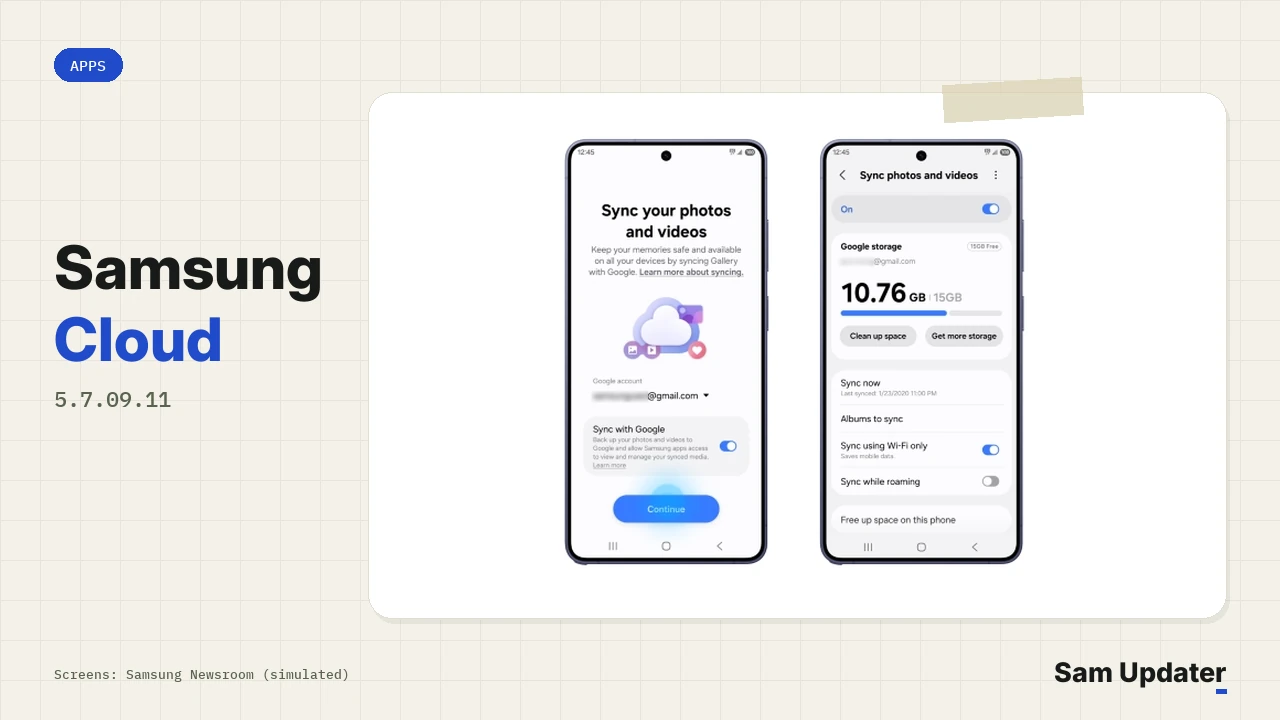
Samsung Cloud 5.7.09.11 is rolling out on Galaxy Store in South Korea and the United States. The update builds new Google Gallery sync proxy components directly into the app. Open Galaxy Store > Menu > Updates to check for it, or use our verified Samsung-signed APK from Telegram below.
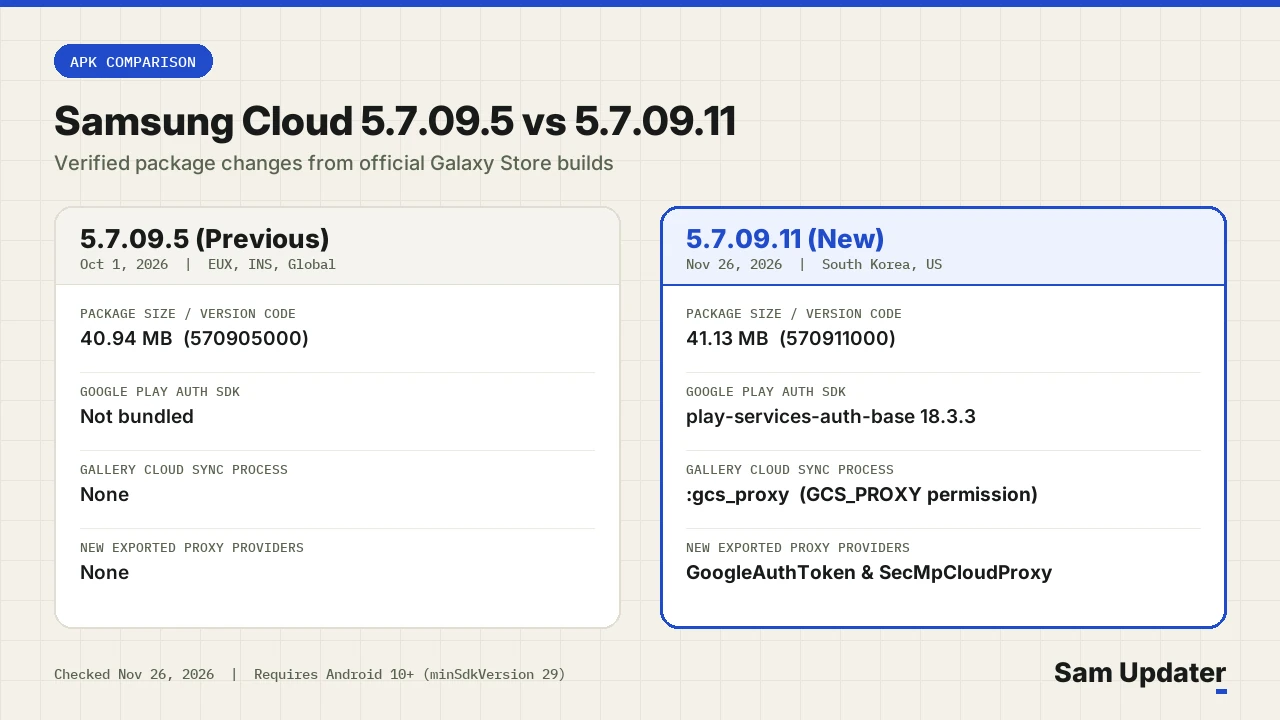
We detected version 5.7.09.11 (versionCode 570911000) going live on Samsung’s update servers on November 26, 2026, at 11:00 UTC (16:30 IST). Comparing this 41.13 MB package against version 5.7.09.5 from October 1 shows a clear shift. Samsung added Google Play Services authentication and a dedicated Gallery Cloud Sync proxy layer inside Samsung Cloud for the first time.
What changed inside Samsung Cloud 5.7.09.11?
This build bundles play-services-auth-base 18.3.3, creates a signature-protected GCS_PROXY permission, and adds two exported ContentProviders inside an isolated :gcs_proxy process. You won’t see new menus after updating. The compiled resource table changed by only four bytes compared to 5.7.09.5.
Diffing the manifest and DEX files side by side shows how Samsung wired it up. Older builds of Samsung Cloud didn’t include Google’s auth library at all. Version 5.7.09.11 adds over 1,000 classes, led by Google’s auth client and a new Kotlin module called GalleryCloudSync.
Four code changes stand out inside the 5.7.09.11 package:
- GoogleAuthTokenProvider (authority com.samsung.android.scloud.sync.google.oauth) calls GoogleAuthUtil for Google OAuth tokens restricted to weblogin: scopes. It rejects callers whose signing certificate fails Samsung’s check.
- SecMpCloudProxyProvider (authority com.samsung.android.scloud.sync.secmp.proxy) runs in the :gcs_proxy process. It forwards media update and delete requests to Samsung’s MediaProvider layer (secmp).
- Both providers sit behind a new com.samsung.android.scloud.permission.GCS_PROXY permission set to protectionLevel=”signature”. Third-party apps cannot query them.
- Backup restore workers gain RestoreCompletionState broadcast handling, alongside a new HEIF syntax editor helper class (com.samsung.mmfw.heifsyntaxeditor).
Samsung’s public Samsung Cloud Galaxy Store listing still shows version 5.7.09.5 from October 1, 2026. It lists no changelog notes for 5.7.09.11 yet. That delay happens often during staged Samsung app rollouts, because update servers start serving newer packages before the web page catches up.
Where Samsung Cloud 5.7.09.11 is live right now
Checks across 24 device and region profiles on November 26 confirm the rollout starts in South Korea and the United States. In Korea (KOO and SKC), 5.7.09.11 is live on Galaxy S26 Ultra (SM-S948N) running One UI 9.5 Beta or One UI 9.0. It is also live there for Galaxy S25 Ultra (SM-S938N), S24 Ultra (SM-S928N), S23 Ultra (SM-S918N), S22 Ultra (SM-S908N), S21 Ultra (SM-G998N), Galaxy Z Fold8 (SM-F976N), and Galaxy A55 (SM-A556S).
Unlocked and carrier US models including Galaxy S26 Ultra (SM-S948U) and Galaxy S25 Ultra (SM-S938U) on XAA and TMB get the same 5.7.09.11 build. Europe, India, and other major markets stay on 5.7.09.5 for now.
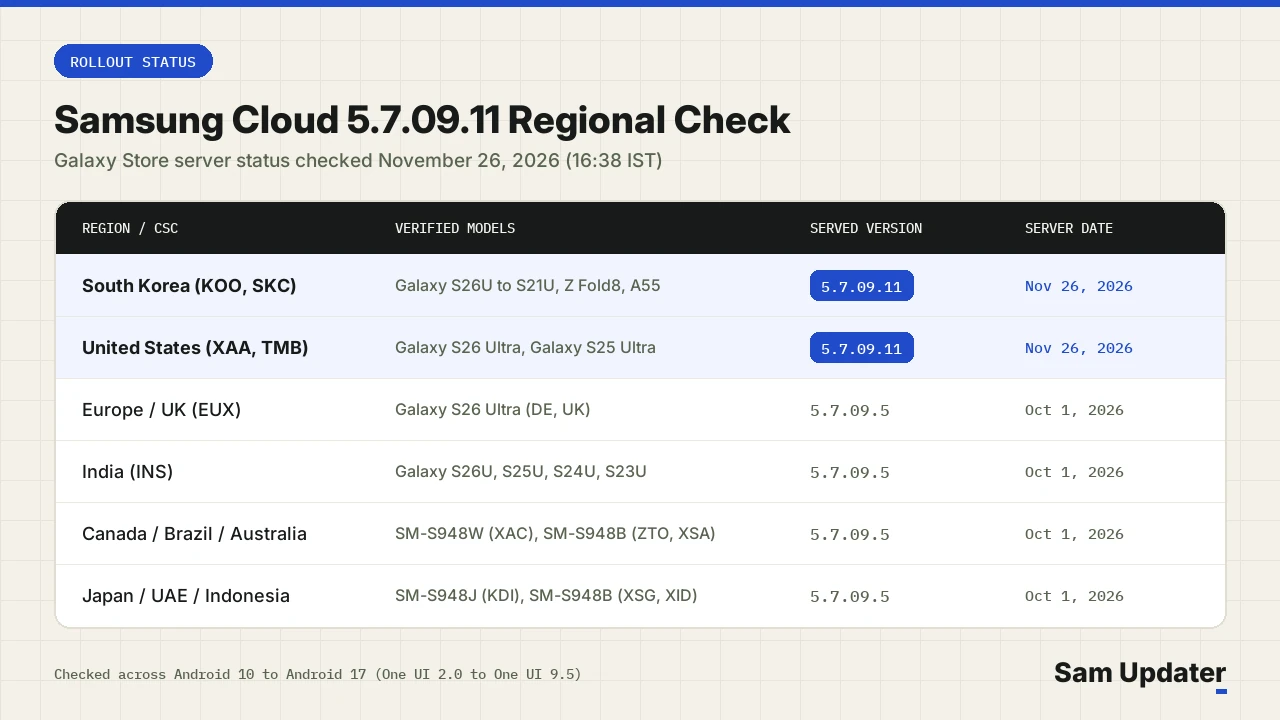
| Region / CSC | Checked models | Served version | Server publish date |
|---|---|---|---|
| South Korea (KOO, SKC) | Galaxy S26U to S21U, Z Fold8, A55 | 5.7.09.11 | November 26, 2026 |
| United States (XAA, TMB) | Galaxy S26 Ultra, Galaxy S25 Ultra | 5.7.09.11 | November 26, 2026 |
| Europe / UK (EUX) | Galaxy S26 Ultra (DE, UK) | 5.7.09.5 | October 1, 2026 |
| India (INS) | Galaxy S26U, S25U, S24U, S23U | 5.7.09.5 | October 1, 2026 |
| Canada, Brazil, Australia (XAC, ZTO, XSA) | SM-S948W, SM-S948B | 5.7.09.5 | October 1, 2026 |
| Japan, UAE, Indonesia (KDI, XSG, XID) | SM-S948J, SM-S948B | 5.7.09.5 | October 1, 2026 |
Why this points to wider Samsung Gallery Google sync support
Everything in this proxy layer connects to Samsung’s fall cloud storage change. On November 10, 2026, Samsung Global Newsroom announced native Samsung Gallery sync with Google storage. Direct Gallery sync to Microsoft OneDrive ended on September 30, 2026. As we detailed in our Samsung Gallery Google sync overview, the service started on select One UI 9 devices using your Google account’s shared 15 GB storage and a Free up space tool.
What stands out in 5.7.09.11 is its broad Android baseline. Samsung’s November 10 announcement named One UI 9 devices first, yet the 5.7.09.11 manifest sets minSdkVersion 29 (Android 10, One UI 2.0). Korean Galaxy Store servers already deliver this exact build to older phones like the Galaxy S22 Ultra on Android 16 and the Galaxy S21 Ultra.
No official timeline exists yet for enabling Gallery Google sync on devices below One UI 9. Installing this backend package alone won’t flip the switch either. Even so, keeping the Google OAuth bridge and MediaProvider proxy inside the standalone Samsung Cloud app lets Samsung update that plumbing through Galaxy Store without waiting for full firmware releases. Check which models already run One UI 9 in our One UI 9 update tracker, or safeguard your data first with our Galaxy backup guide.
How do you install Samsung Cloud 5.7.09.11 on your Galaxy phone?
Open Galaxy Store > Menu > Updates first, since phones in South Korea and the United States already receive 5.7.09.11 automatically. If your region still serves 5.7.09.5, you can sideload the untouched official Samsung APK from our Telegram channel. Any Galaxy phone or tablet on Android 10 or newer is compatible.
Official Samsung APK
Samsung Cloud 5.7.09.11
Version: 5.7.09.11 (570911000) · Size: 41.13 MB · Requires: Android 10+ (One UI 2.0 to One UI 9.5)
Hosted on our official @oneuicommunity Telegram channel. Original Samsung signature untouched, so it installs cleanly over an older Samsung Cloud build.
Supported devices and APK verification
Any Samsung Galaxy phone or tablet on Android 10 (One UI 2.0) through Android 17 (One UI 9.0 and One UI 9.5) meets the manifest requirement. Devices on Android 9 Pie or older will block the install.
| APK detail | Verified info |
|---|---|
| File name | Samsung_Cloud_5.7.09.11_570911000.apk |
| Package name | com.samsung.android.scloud |
| Version | 5.7.09.11 (versionCode 570911000) |
| File size | 41.13 MB (43,123,617 bytes) |
| Minimum OS | Android 10 (minSdkVersion 29, targetSdkVersion 36, compileSdkVersion 37) |
| Verified supported models | Galaxy S26 Ultra, S25 Ultra, S24 Ultra, S23 Ultra, S22 Ultra, S21 Ultra, Z Fold8, A55 (plus compatible Android 10+ Galaxy models) |
| Not supported | Android 9 Pie and older |
| Signer | Samsung Cert (O=Samsung Corporation, OU=DMC) |
| SHA-256 | b5ac87b77f7537e9532a5fa0b6730611c86b220b2d54ee4b2db89cf7d5ca0c93 |
To sideload manually, save the APK from Telegram and enable your browser or file manager under Settings > Security and privacy > Install unknown apps. Tap the APK to install over your current Samsung Cloud app. Confirm the update at Settings > Accounts and backup > Samsung Cloud > About Samsung Cloud, or follow future Galaxy app alerts in our SamUpdater Android app.
Did Samsung Cloud 5.7.09.11 show up in Galaxy Store on your phone yet? Leave your Galaxy model and region in the comments so we can track where it expands next.
Was this article helpful?
Your answer helps us keep it accurate.
Comments (0)
Comments are moderated, and published only if they are relevant to the topic and add value in a constructive way. If you disagree with something, please be polite and respectful.