
Samsung’s newest foldables are getting their October 2026 security update. The rollout started in South Korea on October 1, 2026, and it covers all three models.
That’s the Galaxy Z Fold 8, the Galaxy Z Fold 8 Ultra and the Galaxy Z Flip 8.
In this post, I will tell you what’s in the update, how big it is, when the rest of the world should get it and how to install it on your foldable.
Quick answer: the October 2026 update for the Z Fold 8, Z Fold 8 Ultra and Z Flip 8 has a build number ending in AZIJ. It’s about 530MB, it’s based on One UI 9 (Android 17) and it’s live in South Korea right now. Other regions should follow within one to two weeks.
What’s in the Galaxy Z Fold 8 and Flip 8 October Update?
This is a security update. It brings the October 2026 Android security patch and Samsung’s own fixes for that month.
According to Sammy Fans, the package is around 530MB and it doesn’t bring new features. You may see small stability fixes, but that’s about it.
Your foldable stays on One UI 9 and Android 17. These phones launched with One UI 9 in July 2026, so there’s no big version jump here.
Build Number and Size
| Device | Build ends in | Size | First region | Date |
|---|---|---|---|---|
| Galaxy Z Fold 8 | AZIJ |
About 530MB | South Korea | Oct 1, 2026 |
| Galaxy Z Fold 8 Ultra | AZIJ |
About 530MB | South Korea | Oct 1, 2026 |
| Galaxy Z Flip 8 | AZIJ |
About 530MB | South Korea | Oct 1, 2026 |
Here’s what that ending tells you. “A” means the phone is still on the first One UI version it launched with. “Z” is the year 2026 and “I” is the month the build was made (September). The last letter is the revision. If you want to read every part of a Samsung build, here’s my guide on the Samsung firmware version.
When Will Other Regions Get It?
Samsung hasn’t shared a schedule. But Korea is almost always first, and the rest follows a familiar pattern.
Here’s what I expect based on how the Galaxy S26 October patch rolled out this week:
- Europe and India: within a few days to a week.
- Southeast Asia, the Middle East and Latin America: about one week.
- US carriers and the US unlocked model: one to three weeks.
These are my estimates, not official dates. You can follow it live in the Samsung security update tracker, which shows the first release of every patch by device.
How to Install the October Update on Your Foldable
It’s the same as any other Samsung update. Here’s how to do it:
- Connect to Wi-Fi and charge your phone above 50%.
- Open Settings.
- Tap Software update.
- Tap Download and install.
- Tap Install now once the download finishes.
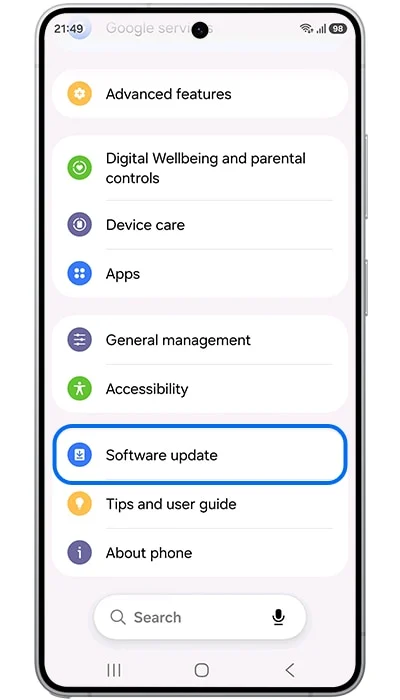
The phone restarts once and you’re done. To confirm, go to Settings > About phone > Software information and look at the Android security patch level. It should say October 2026.
If you’re outside Korea, the update won’t show up yet. That’s normal. Give it a few days.
How Long Will the Z Fold 8 and Flip 8 Get Updates?
A long time. The Z Fold 8, Z Fold 8 Ultra and Z Flip 8 get seven years of Android upgrades and seven years of security updates.
They launched on Android 17, so they should go up to around Android 24 and get patches until 2033. I have explained how this works in my post on the Samsung update policy.
Frequently Asked Questions
Is One UI 9.5 coming to the Z Fold 8 and Flip 8?
Yes. Samsung is already testing One UI 9.5 builds for the Z8 foldables, but a release is still months away.
Do I need to install this update?
I’d say yes. Security patches close holes that apps and websites could use to attack your phone. It only takes a few minutes.
Will the update reset my phone?
No. It keeps all your apps, photos and settings.
Final Words
That’s it. If you’re in South Korea, the October update is waiting for you right now. Everyone else, keep an eye on Settings > Software update over the next week or two.
Which foldable do you have, and where are you? Drop your model number (Settings > About phone) and region in the comments, and I’ll let you know when your build is out.
Was this guide helpful?
Your answer helps us keep it accurate.
Comments (0)
Comments are moderated, and published only if they are relevant to the topic and add value in a constructive way. If you disagree with something, please be polite and respectful.