
If you own a Galaxy S26 and installed One UI 9 this week, you probably got a surprise right after. Another update popped up a few hours later.
No, it’s not a mistake. Samsung pushed the October 2026 security patch to the Galaxy S26 almost on the heels of the stable One UI 9 release.
In this post, I will show you what this second update is, the exact build numbers, which regions have it and what you should do if your phone shows two updates in a row.
Quick answer: the second update is the October 2026 security patch, build S94xBXXS4BZIG. It’s about 544MB and it came out on September 29, 2026, only hours after One UI 9. Install One UI 9 first, then install the patch.
What Is the Second Galaxy S26 Update?
The Galaxy S26, S26+ and S26 Ultra got stable One UI 9 (Android 17) in Europe on September 29, 2026. The build was S94xBXXU4BZI6 and it carried the September 2026 patch.
A few hours later, Samsung released S94xBXXS4BZIG with the October 2026 security patch. SamMobile called it the first time Samsung has done this right after a major update.
Look at the build number closely. The new one has “XXS4” in the middle, where the One UI 9 build had “XXU4”. That “S” means it’s a security update, not a feature update. I have explained every letter in my post on the Samsung firmware version.
So don’t expect new features here. It’s a small download that brings your phone from the September patch to the October one.
Galaxy S26 October 2026 Update: Build Numbers
Here’s where the October patch has landed so far, based on our own firmware feed:
| Region | Model | Build | Date |
|---|---|---|---|
| Europe (EUX) | SM-S942B, SM-S947B, SM-S948B | S94xBXXS4BZIG |
Sep 29, 2026 |
| India, Middle East, Africa, Southeast Asia, Australia | SM-S942B, SM-S947B, SM-S948B | S94xBXXS4BZIG |
Sep 30, 2026 |
| South Korea | SM-S942N, SM-S947N, SM-S948N | S94xNKSS4BZIG |
Sep 30, 2026 |
| Mexico, Guatemala | SM-S942B, SM-S947B, SM-S948B | S94xBXXS4BZIG |
Oct 1, 2026 |
| Taiwan, Hong Kong | SM-S9420, SM-S9470, SM-S9480 | S94x0ZHS4BZIG |
Oct 1, 2026 |
Replace the “x” with 2 for the Galaxy S26, 7 for the S26+ and 8 for the S26 Ultra. For example, the S26 Ultra build in Europe is S948BXXS4BZIG.
That’s around 29 CSC regions per model in just three days. Pretty fast for Samsung.
Live Status: Galaxy S26 Security Patch
This table pulls from our tracker and updates itself, so you can see which S26 models are on the newest patch right now.
Live data from Samsung's official release notes. Last checked Oct 2, 2026, 21:11 UTC.
| Device | October 2026 patch | First release | First build |
|---|---|---|---|
| Galaxy S26 Ultra | Available (32 regions) | Sep 29, 2026, Europe (EUX) | S948BXXS4BZIG |
| Galaxy S26+ | Available (31 regions) | Sep 29, 2026, Europe (EUX) | S947BXXS4BZIG |
| Galaxy S26 | Available (32 regions) | Sep 29, 2026, Europe (EUX) | S942BXXS4BZIG |
For every other Galaxy phone, check the Samsung security update tracker.
What About the Galaxy S26 in the US?
US models are a step behind. They got One UI 9 first, but the October patch hasn’t shown up on our feed yet.
| Carrier or variant | One UI 9 build | Date |
|---|---|---|
| T-Mobile | S94xUSQU4BZID |
Sep 23, 2026 |
| AT&T | S94xUSQU4BZID |
Sep 28, 2026 |
| US unlocked (XAA) | S94xU1UEU4BZID |
Sep 28, 2026 |
| Canada | S94xWVLU4BZID |
Sep 29, 2026 |
If you’re in the US, expect the October patch as a separate update over the next couple of weeks. Verizon and T-Mobile are usually the first carriers to get it.
Why Did Samsung Release Two Updates So Close Together?
Samsung didn’t explain it. But here’s my take.
One UI 9 was finalized weeks ago with the September patch. Rather than hold the global release to rebuild it, Samsung shipped One UI 9 as it was and sent the October patch right behind it.
That’s good news for you. Your Galaxy S26 is now one of the very first phones on the October 2026 patch, even before Samsung has published the October security bulletin.
How to Install Both Updates on Your Galaxy S26
If you’re still on One UI 8.5, you will most likely get One UI 9 first and the October patch right after it. Here’s how to do it:
- Back up your phone from Settings > Accounts and backup > Back up data.
- Go to Settings > Software update > Download and install.
- Install One UI 9 and let the phone restart.
- Go back to Settings > Software update > Download and install again.
- Install the October 2026 patch.
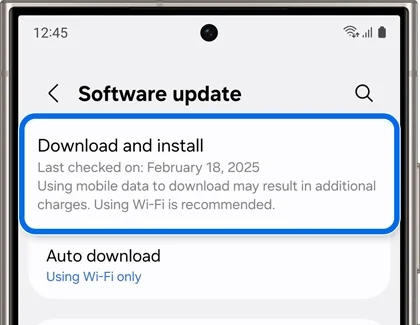
To confirm, go to Settings > About phone > Software information. Your Android security patch level should show October 2026.
If nothing shows up, don’t worry. Samsung rolls out in batches. Here’s what to do when the One UI 9 update is not showing.
Frequently Asked Questions
Can I skip One UI 9 and only install the October patch?
No. The October build is made for One UI 9, so your phone needs One UI 9 first.
Will the October patch wipe my data?
No. It’s a regular OTA update and it keeps your apps and files.
What does the October 2026 patch fix?
Samsung hasn’t posted its October security bulletin yet. It usually goes up in the first week of the month. I’ll update this post once it’s out.
Is there a downgrade path if I don’t like One UI 9?
Yes, but it wipes your phone. Here’s how to downgrade One UI 9 to One UI 8.5. The October patch keeps the same bootloader version (the “4” in the build), so it doesn’t change your downgrade options.
That’s it. If you own a Galaxy S26 outside the US, you can get both One UI 9 and the October patch today. US users should see the patch soon.
Which Galaxy S26 model do you have, and which build is it on right now? You’ll find it in Settings > About phone > Software information. Drop it in the comments and I’ll tell you if a newer one is out for your region.
Was this guide helpful?
Your answer helps us keep it accurate.
Comments (0)
Comments are moderated, and published only if they are relevant to the topic and add value in a constructive way. If you disagree with something, please be polite and respectful.