
If OEM unlocking is missing from Developer options on your Samsung Galaxy, the most likely reason is the software on it. Starting with One UI 8, Samsung removed the toggle from Galaxy phones worldwide, not just in the US. So a phone running One UI 8, One UI 8.5 or One UI 9 can’t unlock its bootloader the normal way.
On older software, the toggle also hides when Developer options is off, on US and Canada models, and when Knox Guard is active on the phone. Let me help you figure out which one applies to yours. It takes about two minutes.
Why is OEM unlocking missing on my Samsung phone?
OEM unlocking disappears for four reasons: your Galaxy runs One UI 8 or later, Developer options isn’t turned on, the phone is a US or Canada model, or Knox Guard is locking it. Only the Developer options reason has a real fix. The One UI 8 removal has no official way back.
| Reason | How to tell | Can you fix it? |
|---|---|---|
| Your phone runs One UI 8, 8.5 or 9 | Settings > About phone > Software information > One UI version | No official way |
| Developer options is off | There’s no Developer options entry in Settings | Yes, tap Build number seven times |
| US or Canada model | Model number ends in U, U1 or W, like SM-S938U | No, these models never had it |
| Knox Guard is active | KG STATE in Download mode shows Active, Locked or Prenormal | Only the seller or carrier can release it |
Start at the top of the table. On a phone bought in 2026, the first row is almost always the answer.
Did One UI 8 remove OEM unlocking on Galaxy phones?
Yes. In July 2025, users found that the OEM unlocking toggle was gone in One UI 8 builds for the Galaxy S25 Ultra and on the Galaxy Z Fold 7 and Z Flip 7, which shipped with One UI 8. 9to5Google covered the first reports, and Android Authority confirmed it on a non-US Z Fold 7.
The cause sits in the bootloader itself. An XDA developer found a new line, androidboot.other.locked=1, in One UI 8 firmware. When it’s set, the Settings app simply doesn’t show the OEM unlocking row. That’s why searching Settings for it gives you nothing.
Nothing changed with One UI 8.5 or One UI 9. Galaxy S26 owners on XDA Forums report there’s no toggle on phones that launched with One UI 8.5, and a June 2026 thread claiming the option had come back turned out to be wrong.
Samsung hasn’t explained the change. I couldn’t find any public statement from the company as of October 25, 2026.
How do you check your One UI version?
Open Settings > About phone > Software information and read the One UI version line. If it says 8.0, 8.5 or 9.0, the missing toggle comes from the software, and no setting will bring it back. If it says 7.0 or lower, keep reading, because one of the other reasons applies.
- Open Settings.
- Tap About phone. On a tablet, it’s About tablet.
- Tap Software information.
- Look at One UI version.
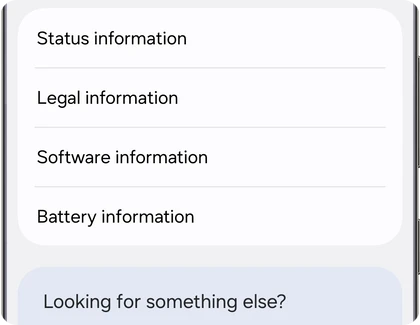
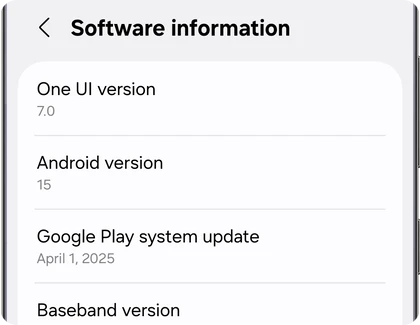
For example, a Galaxy S24 Ultra that installed the One UI 8 update shows 8.0 or higher here, even though the same phone had OEM unlocking on One UI 7.
How do you turn on Developer options on a Galaxy?
Go to Settings > About phone > Software information and tap Build number seven times. Enter your PIN, pattern or password when asked. Developer options then shows up at the bottom of Settings. These are the steps from Samsung’s own support page.
- Open Settings > About phone > Software information.
- Tap Build number seven times.
- Enter your lock screen PIN, pattern or password.
- Go back to the main Settings screen and scroll to the bottom.
- Open Developer options and look for OEM unlocking.
On One UI 7 and older, the OEM unlocking row sits a few lines down, right below Enable Bluetooth HCI snoop log. Here’s how it looked on a Galaxy running One UI 4.1.
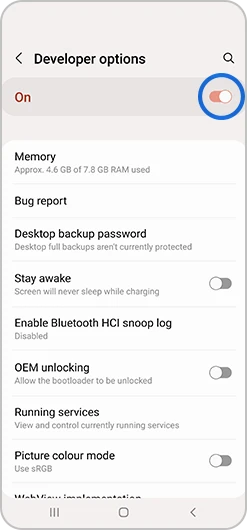
On One UI 8 and later, you’ll see Developer options with every other row in place. Only OEM unlocking is missing.
Is your Galaxy a US or Canada model?
Check the model number in Settings > About phone. If it ends in U, U1 or W, like SM-S938U, SM-S938U1 or SM-S938W, the phone never had OEM unlocking. Samsung locks the bootloader on US and Canada models for good, on every One UI version.
Global models end in B, like SM-S938B. Those had the toggle up to One UI 7. We explain what each letter in a model and build number means in our Samsung firmware version guide.
What does KG STATE in Download mode mean?
KG STATE shows the Knox Guard status, the lock carriers and stores use for financed or rented phones. If it reads Active, Locked or Prenormal, the phone won’t accept unofficial files, and OEM unlocking can stay hidden even on One UI 7. Checking, Completed or Broken means Knox Guard isn’t blocking you.
The OEM LOCK line on the same screen helps too. According to the UN1CA developer notes, ON (L) means fully locked, ON (U) means locked with OEM unlocking turned on, and OFF (U) means the bootloader is already unlocked.
To see both lines, boot into Download mode. Our Odin flashing guide for the Galaxy S26 shows the button combo. Read the lines, then hold Volume Down and Power to restart without flashing anything.
If the phone is financed or came from a carrier plan, only the seller or the carrier can release Knox Guard. Don’t buy “KG remove” services online. Most of them are scams, and the rest can leave you with a phone that won’t boot.
Can you get OEM unlocking back after updating to One UI 8?
Only by going back to One UI 7, and that’s only possible when the One UI 7 firmware for your model has the same bootloader binary as the firmware on your phone now. Samsung bumps the binary in later updates, and once it goes up, older firmware won’t flash.
The binary is the fifth character from the end of your build number. We walk through the downgrade process, binary check included, in our One UI 9 to One UI 8.5 downgrade guide. The same rule applies when going from One UI 8 back to 7.
If you try anyway with a lower binary, Odin stops with an error and the phone shows SW REV CHECK FAIL. We cover that in our guide to the Odin FAIL! (Auth) error.
Skip paid unlock tools, EDL flashing tricks and APKs that promise to bring the toggle back. I haven’t seen a single verified report of any of them working on One UI 8 firmware, and XDA members warn that EDL flashing can hard-brick the phone. If you ask me, if you need an unlockable phone today, buy a Galaxy that never got One UI 8, or a different brand.
What still works without OEM unlocking?
A lot, actually. You can still flash official Samsung firmware with Odin, install updates manually, change between HOME_CSC and CSC files, and downgrade within the same binary. None of that needs an unlocked bootloader.
What you lose is everything custom: Magisk root, TWRP, custom kernels and custom ROMs. My Galaxy S24 Ultra root guide, for example, only works on a phone that still shows OEM unlocking, which means One UI 7 or earlier on a global model.
Frequently asked questions
Will a factory reset bring OEM unlocking back?
No. On One UI 8 and later, the toggle is removed from the software, and a factory reset reinstalls the same software. On older versions, a reset doesn’t change your model or your Knox Guard status either.
Does the Galaxy S26 have OEM unlocking?
No. The Galaxy S26, S26+ and S26 Ultra launched with One UI 8.5, and owners report there’s no OEM unlocking row in Developer options on any region’s model.
Does unlocking the bootloader trip Knox?
Unlocking the bootloader on its own wipes the phone but doesn’t trip Knox. Flashing a custom file like a Magisk-patched AP or TWRP trips the Knox warranty bit for good. After that, Samsung Wallet, Secure Folder and some banking apps stop working.
Has Samsung said why it removed OEM unlocking?
No. As of October 25, 2026, Samsung hasn’t made any public statement about it, and the change has stayed in place through One UI 8.5 and One UI 9.
Was this guide helpful?
Your answer helps us keep it accurate.
Comments (0)
Comments are moderated, and published only if they are relevant to the topic and add value in a constructive way. If you disagree with something, please be polite and respectful.