
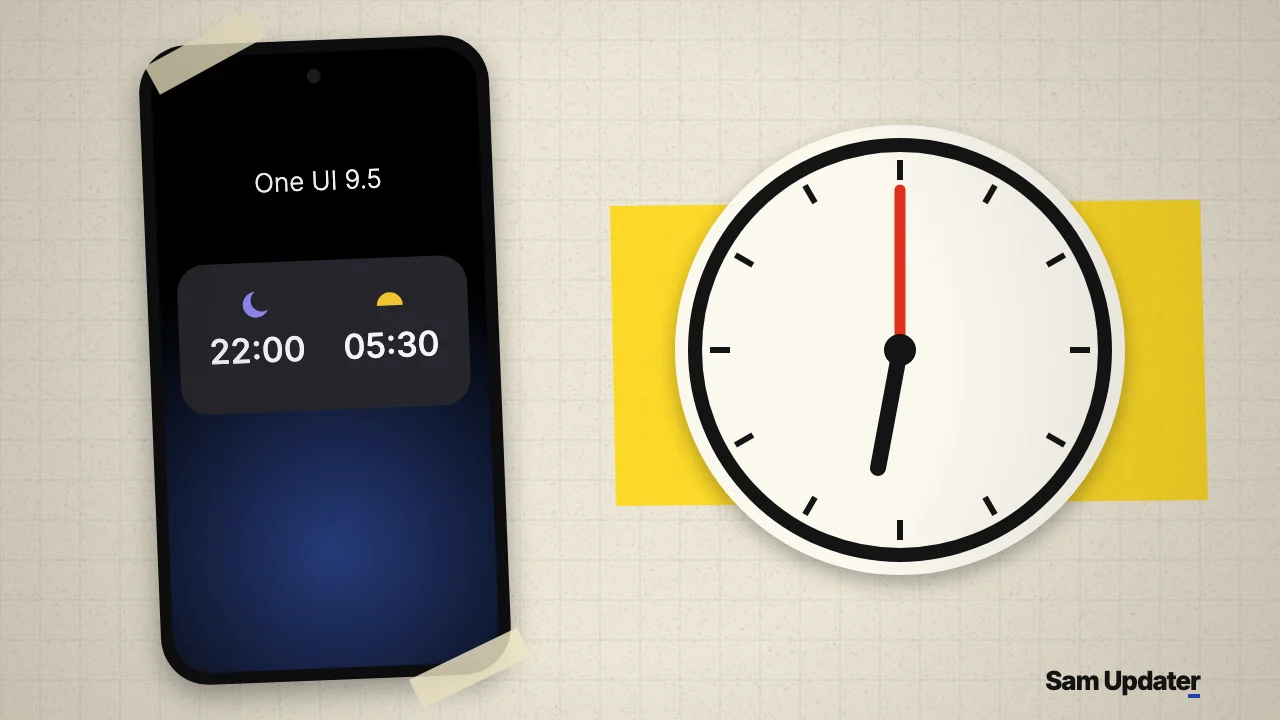
SamMobile shared screenshots of the One UI 9.5 Clock app on November 6, 2026, and the changes are small but useful. A sleep alarm now shows your bedtime and wake-up time side by side, and SamMobile says the search button has moved to the bottom of the screen. You can’t get this version yet, because One UI 9.5 hasn’t been released.
SamMobile’s own verdict is “Big changes? Not really.” I’d agree, with one exception. The search move also showed up in Samsung Calendar this week, and that makes it more interesting than a single redesign.
One UI 9.5 Clock changes, side by side
I went through the four screenshots, two from each version. This is what actually differs:
| Screen | One UI 9 | One UI 9.5 |
|---|---|---|
| Sleep alarm card | 05:30 large, with 22:00 small above it | 22:00 and 05:30 at the same size, in two columns |
| Moon and sun icons | Small and placed beside the times | Centered above each time |
| Sleep alarm switch | Right side, level with the time | Bottom right, level with the days |
| World clock background | Soft color gradient | Dark map of Europe |
| World clock order | London, then Amsterdam | Amsterdam, then London |
The sleep alarm card is the real improvement. On One UI 9, your bedtime is a tiny label. On One UI 9.5, it gets the same weight as your wake-up time, so you can read both at a glance.
The city order may mean nothing. Amsterdam is the local time zone in these screenshots, but a person can reorder that list, so I wouldn’t call it a new rule yet.
What stays the same in the One UI 9.5 Clock app
Most of the app doesn’t move. The four tabs at the bottom are still Alarm, World clock, Stopwatch and Timer, in that order. Regular alarms keep the same stacked cards with the days below each time.
The top buttons don’t change either. Sammy Fans’ breakdown calls the three-dot menu on the Alarm page an addition, but SamMobile’s One UI 9 screenshot already has it next to the plus button. The World clock page has the same three icons in both versions too.
Search moves down in Clock and Calendar
SamMobile says the One UI 9.5 Clock search button now sits at the bottom of the screen for easier one-handed use. The four screenshots don’t show that button. Sammy Fans places it on the globe view, where the search and location icons move from the top right to floating buttons at the bottom right.
Now look at Samsung Calendar. SamMobile’s Calendar first look shows the same idea, with search moving from the top of the screen to a round button at the bottom right, next to the Add event bar.
That’s two Samsung apps with the same change in One UI 9.5 test software. It doesn’t prove every app will follow. But if you use a big Galaxy phone with one hand, it’s the One UI 9.5 change I’d keep an eye on.
When can you get the One UI 9.5 Clock app?
Not yet. One UI 9.5 only exists as test builds, and Samsung hasn’t opened a beta or announced a date. We track the expected phones and timing in our One UI 9.5 hub, and this post will show up there too.
The first beta build for the Galaxy S26 Ultra appeared on November 4, as we covered in our One UI 9.5 beta build post. Screenshots from a test version can also change before release, so treat this table as a preview.
Clock annoyances on your current phone are a separate topic. If your lock screen shows 07:00 instead of 7:00, we looked at that in our AOD clock leading zero report.
Was this guide helpful?
Your answer helps us keep it accurate.

Comments (0)
Comments are moderated, and published only if they are relevant to the topic and add value in a constructive way. If you disagree with something, please be polite and respectful.