
For a Samsung battery health check, open Samsung Members, tap Support and choose Get started in Phone diagnostics. Run Battery status. If you also use adb shell dumpsys battery, read its health field as a status code rather than a battery-wear percentage.
I would begin with the Samsung diagnostic and keep the result separate from the charge percentage beside your battery icon. A phone charged to 80% and a battery that has lost capacity are different things to investigate.
Run Battery status in Samsung Members
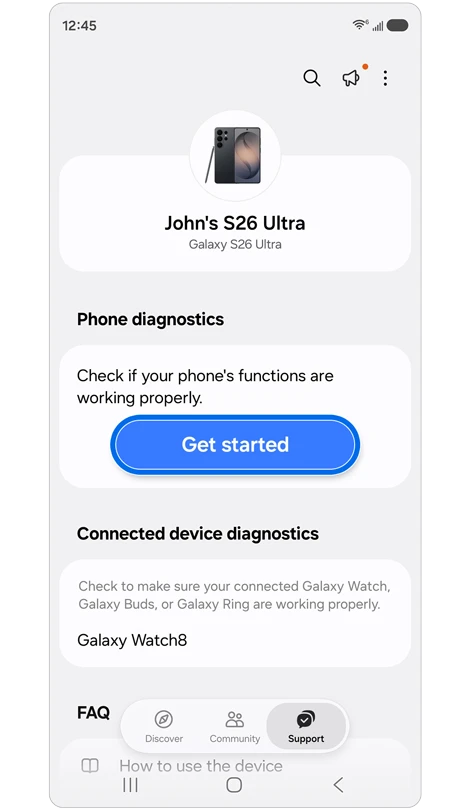
Samsung Canada documents the Members check for Galaxy battery condition. Its steps use Support, Get started, and Battery status. Menu names can vary with the model, software, and app version.
- Open Samsung Members on your Galaxy.
- Tap Support.
- Select Get started under Phone diagnostics.
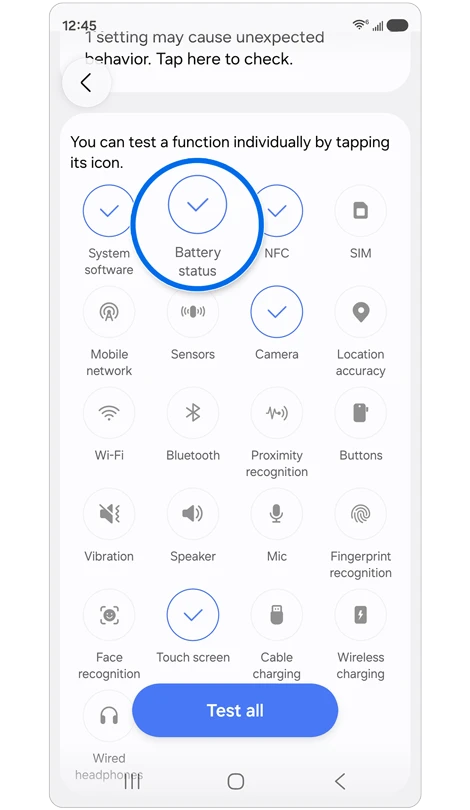
- Open Battery status from the diagnostic items.
- Read the result and note any advice shown with it.
On the layout described by Samsung Canada, you may need to begin the full diagnostics, stop that test, and then select the individual item you want. Follow the controls shown in Members rather than assuming every version opens on the same screen.
Read Normal, Weak, or Bad as the diagnostic result
Samsung's UK guide explains the result labels. Use the actual label your Galaxy reports before trying to interpret a number from another tool.
| Result | Samsung's explanation |
|---|---|
| Normal | The diagnostic identifies no battery issue. |
| Weak | Battery efficiency may have decreased with use or environmental conditions. |
| Bad | Battery life has degraded considerably. Samsung advises contacting a support center. |
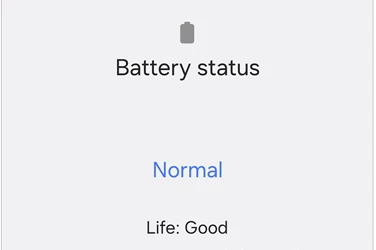
A result label is useful when asking Samsung for help. Include the behavior that prompted the test, such as shorter use between charges or unexpected shutdowns. Samsung Canada recommends support if battery-related problems continue.
Use ADB for a readout of the battery service
If you already use Google's Android Debug Bridge, connect your Galaxy and check that adb devices lists it in the device state. Our Samsung ADB authorization guide covers the approval step if it says unauthorized instead.
Run this read-only command from your Platform-Tools terminal:
adb shell dumpsys batteryWhen running the local executable directly, use .\adb.exe in Windows PowerShell or ./adb on macOS and Linux in place of adb. Read the output from your own Galaxy; the command here is syntax, not a captured test result.
The Android battery-service implementation prints standard fields including power-source flags, charge counter, health, level, scale, voltage, and temperature. Samsung software can include additional lines, so keep the field names when saving a readout.
Separate health, charge level, and capacity fields
Google's BatteryManager reference defines health as a current status constant. BATTERY_HEALTH_GOOD has the value 2. A standard health: 2 readout therefore represents that code; it is not 2% remaining battery health or a promise of full original capacity.
The same reference defines level relative to scale, and documents charge-counter units as microampere-hours. Read these fields according to their definitions rather than treating every battery number as a wear measurement.
| Field | How to read it |
|---|---|
| health | A status code with defined constants. |
| level and scale | The current reported charge level and its maximum scale. |
| Charge counter | A capacity-related value with microampere-hour units. |
| temperature | The Android battery service uses tenths of a degree Celsius for this field. |
If you are comparing readings, keep the charging state and full field label with the value. A number copied without its label is easy to confuse with another measurement. Use model-specific documentation before interpreting additional Samsung fields as a cycle count, manufacturing date, or health percentage.
Keep battery simulation commands out of a condition check
Commands that set battery values are for a different task. Android's battery-service help describes set as forcing a value and freezing the reported state. Making a displayed level change does not repair the physical battery.
If you previously used a simulation command and the readout explicitly says UPDATES STOPPED, Android documents reset as returning reporting to current hardware values:
adb shell dumpsys battery resetUse that to end the simulated state you started. Keep it separate from claims about restoring battery capacity or calibrating wear.
FAQ
Does stopping at 80% mean the battery is worn out?
Check the configured charging limit first. Our Galaxy Battery protection guide explains intentional charge limits. That setting answers how far to charge, while Members diagnostics checks the battery condition.
Can I calculate exact cycle count from an unfamiliar ADB field?
Record the field as shown and seek documentation for your model and software before treating it as cycles. For help interpreting a result, tell me the Galaxy model, One UI version, Members result, and the exact named field. Leave serial numbers and other personal identifiers out of a public screenshot.
Was this guide helpful?
Your answer helps us keep it accurate.
Comments (0)
Comments are moderated, and published only if they are relevant to the topic and add value in a constructive way. If you disagree with something, please be polite and respectful.