
Update: November 12, 2026. I have added our Samsung server comparison below. The returned versions differ by request configuration, and the checked release notes do not identify the widget fix.
Samsung is preparing a fix for a One Hand Operation+ widget bug after a user reported that the app’s widget popup had become much smaller. In a November 12 Samsung Members reply, the development team acknowledged a problem in the latest update. The original report names version 9.4.21.0.
A corrected release is being prepared, but the reply gives neither a release date nor the version number that will contain the fix.
Samsung acknowledges the widget popup problem
The reply was posted at 02:09 UTC on November 12 by GoodLock담당, an account with a public Moderator badge. The message identifies its author as the One Hand Operation development team and says a widget-popup problem occurred in the latest update distributed the previous day.
The original post appeared at 09:32 UTC on November 11, about 16 hours before the response. In translation, the team says: ‘There was a problem with the widget popup in the latest update released yesterday.’ It apologizes and says it is working on a correction, with another update to follow as quickly as possible.
What the 9.4.21.0 report describes
The owner opened the thread on November 11. They say the widget popup previously occupied most of the screen’s width, but became narrower after installing One Hand Operation+ 9.4.21.0. Their home screen uses a 5×7 grid, while the popup uses four columns.
They suggest that the difference between those grids might explain the smaller widgets. Samsung’s reply does not confirm that explanation. Another member in the thread also describes an awkward size and centered placement, but neither report identifies a Galaxy model or firmware build.
Our One Hand Operation+ shortcut guide explains how those handles and assignments work. The developer’s response concerns the widget popup, not every gesture action.
It is also a separate report from the Galaxy S25 home-screen widget text complaint we covered earlier. Here, the owner names a particular app version and describes the popup’s width; the reply addresses that app feature.
Samsung’s server returns two app versions
If Galaxy Store still shows you 9.3.13.0, check the version before comparing your popup with this report. Our Samsung update-server check returned 9.4.21.0 for the SM-S931N/KOO request, while four other model and CSC combinations returned 9.3.13.0.
| Model and CSC in the request | Version returned | Version code |
|---|---|---|
| SM-S948B / INS | 9.3.13.0 | 931300000 |
| SM-S928B / EUX | 9.3.13.0 | 931300000 |
| SM-S931B / INS | 9.3.13.0 | 931300000 |
| SM-S931B / EUX | 9.3.13.0 | 931300000 |
| SM-S931N / KOO | 9.4.21.0 | 942100000 |
We queried Samsung’s public server on November 12 between 06:32 and 06:36 UTC, or 12:02 and 12:06 IST, then rechecked the first and last combinations at 06:47 UTC, or 12:17 IST. These were server requests using SDK 37, One UI value 90000, 64-bit ABI and an installed-version value of 1, not tests on five phones or a complete country availability list.
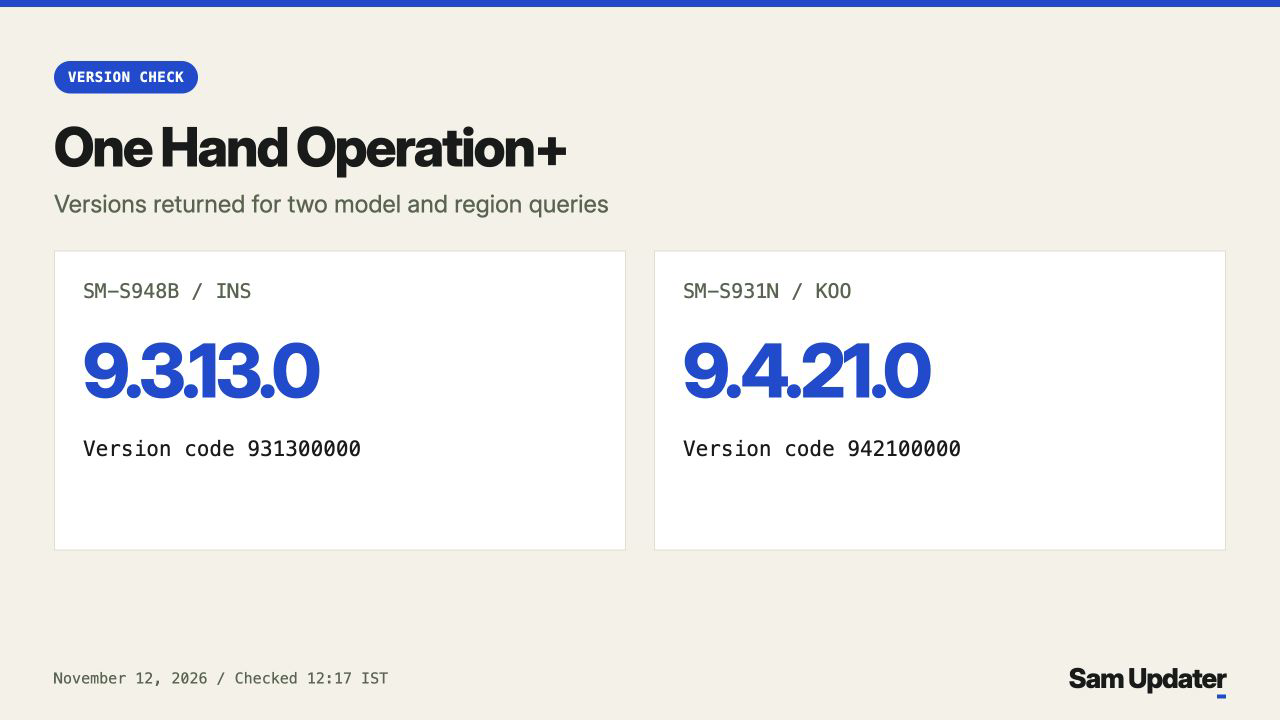
We also repeated the SM-S948B/INS query with installed-version code 931300000 and the SM-S931N/KOO query with 942100000. Both returned ‘Not necessary to update’ for their respective versions.
There is a mismatch in Samsung’s public Galaxy Store listing data too. Its version field says 9.3.13.0, while the release notes are headed 9.4.21.0 and describe a Home-button long-press repair in horizontal orientation, plus general bug fixes. They do not name a widget-popup repair. We have not verified a corrected build in these checks.
Check the next app update
I would watch for the follow-up One Hand Operation+ release before rebuilding a home-screen layout around this change. The development team’s message offers no grid-setting workaround.
For an app installed through Galaxy Store, Samsung’s US update instructions give the route Galaxy Store > Menu > Updates. Check the One Hand Operation+ entry and read its release notes when an update appears. A newer version number alone won’t tell you whether this particular repair is included.
If your widget popup changed too, tell me your Galaxy model, One Hand Operation+ version, and what happened to its size or position.
Was this guide helpful?
Your answer helps us keep it accurate.
Comments (0)
Comments are moderated, and published only if they are relevant to the topic and add value in a constructive way. If you disagree with something, please be polite and respectful.