
For an ADB unauthorized result on your Samsung Galaxy, look for an Allow USB debugging prompt on the phone and approve it only for a computer you trust. Then run adb devices again and look for the device state.
Allowing file access is a different permission. I would identify which prompt you accepted before reinstalling drivers or changing security settings. An unauthorized entry already gives you more information than an empty device list.
Read the connection state first
Use Google's official SDK Platform-Tools package for your computer. Open a terminal in the extracted platform-tools folder and list the connected devices.
In Windows PowerShell, run:
.\adb.exe devices -lOn macOS or Linux, run:
./adb devices -lMicrosoft explains the PowerShell prefix: a relative path such as .\ tells PowerShell to run the executable in the current directory. The commands below use the shorter adb form; keep the appropriate prefix if ADB is not in your PATH.
| Result | Your next check |
|---|---|
| unauthorized beside the Galaxy entry | Check USB debugging authorization on the phone. |
| offline | Check the connection and reconnect it. Google defines this as disconnected or not responding to ADB. |
| No Galaxy entry | Check USB debugging, the data connection, and any required computer driver. |
| device | The Galaxy is connected to the ADB server. This label alone does not say Android has finished booting. |
Those states come from the ADB connection, rather than whether File Explorer happens to show the phone. Note the state you actually get before moving to the next branch.
Accept the debugging request on the Galaxy
Google's ADB documentation explains the RSA authorization dialog. Android requires you to open the device and acknowledge the request before that computer can use USB debugging commands.
- Keep the Galaxy connected to your trusted computer with a data-capable USB cable.
- Enter the phone's screen-lock credentials so you can see its prompts.
- Check Settings > Developer options > USB debugging if debugging has not been enabled.
- Run the device-list command again while watching the phone.
- Read the Allow USB debugging request and approve the intended computer.
- Repeat adb devices -l and check whether the state changes to device.
If Developer options is hidden, Samsung Ireland documents its setup: open Settings > About phone > Software information, tap Build number seven times, and enter your screen-lock credentials when requested.
Authorize the computer you are actually using. There is no need to approve an unfamiliar request just because you are trying to clear an error.
Do not confuse file access with debugging approval
The prompt below says Allow access to phone data. Samsung Canada shows it for PC file access. Google describes the separate debugging request as authorization of the computer's RSA key.

If you accepted this file prompt and still see unauthorized, return to the debugging request. Repeating the file-transfer permission is not the next authorization step.
For a separate problem where Windows cannot open the Galaxy's folders, our USB file-transfer checks cover that connection. Keep the two tasks separate while diagnosing them.
Force a reconnect if the debugging request does not appear
Disconnect other ADB devices before this check so you can concentrate on the Galaxy. Google's official ADB command reference documents reconnect offline for reconnecting offline or unauthorized devices.
adb reconnect offline
adb devices -l
Watch for the phone's authorization dialog again. The command requests a reconnect; it does not approve a computer for you.
If necessary, close other tools using ADB and restart its server:
adb kill-server
adb start-server
adb devices -l
Google defines these as stopping and starting the computer's ADB server. This interrupts its other ADB connections too, so finish any active device operation first. These are connection checks, not instructions to erase phone data.
If the phone says USB commands are blocked
Treat an explicit security-blocking message separately from an authorization dialog. Samsung documents Auto Blocker's USB command protection under Settings > Security and privacy > Auto Blocker.
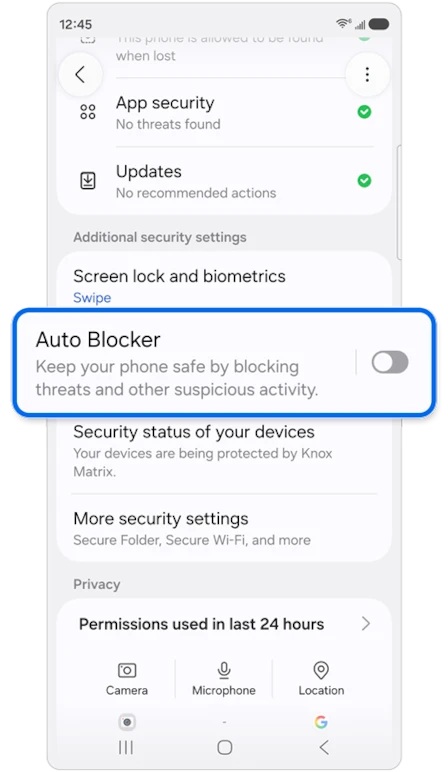
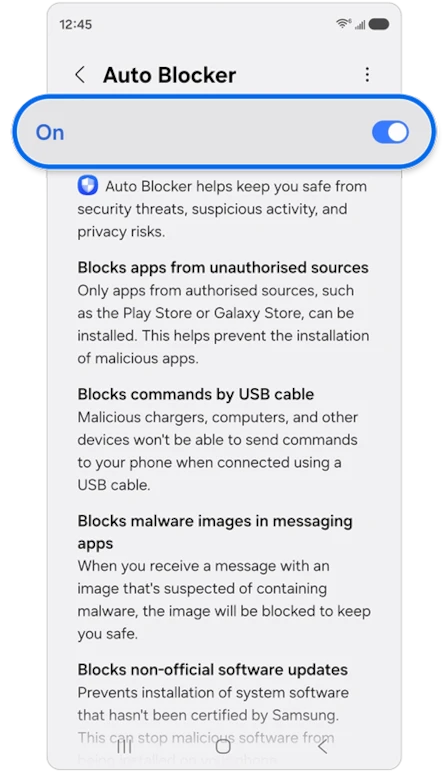
Samsung recommends leaving Auto Blocker enabled for protection. If you deliberately pause that protection for a trusted development connection, restore it when you finish. An ADB error by itself is not a reason to turn off every security control on the phone.
FAQ
Should I install the Samsung USB driver for unauthorized?
Start with authorization when a Galaxy entry already says unauthorized. If the device list is empty and you are checking the Windows driver branch, our official Samsung USB driver guide explains that package and its scope. The driver and Platform-Tools are different components.
What should I share if ADB still cannot connect?
Tell me the Galaxy model, One UI version, computer operating system, and the exact state from the device list. Include whether a debugging prompt appeared or the phone showed a blocking message. You can omit the device serial number when posting that information publicly.
Was this guide helpful?
Your answer helps us keep it accurate.
Comments (0)
Comments are moderated, and published only if they are relevant to the topic and add value in a constructive way. If you disagree with something, please be polite and respectful.