
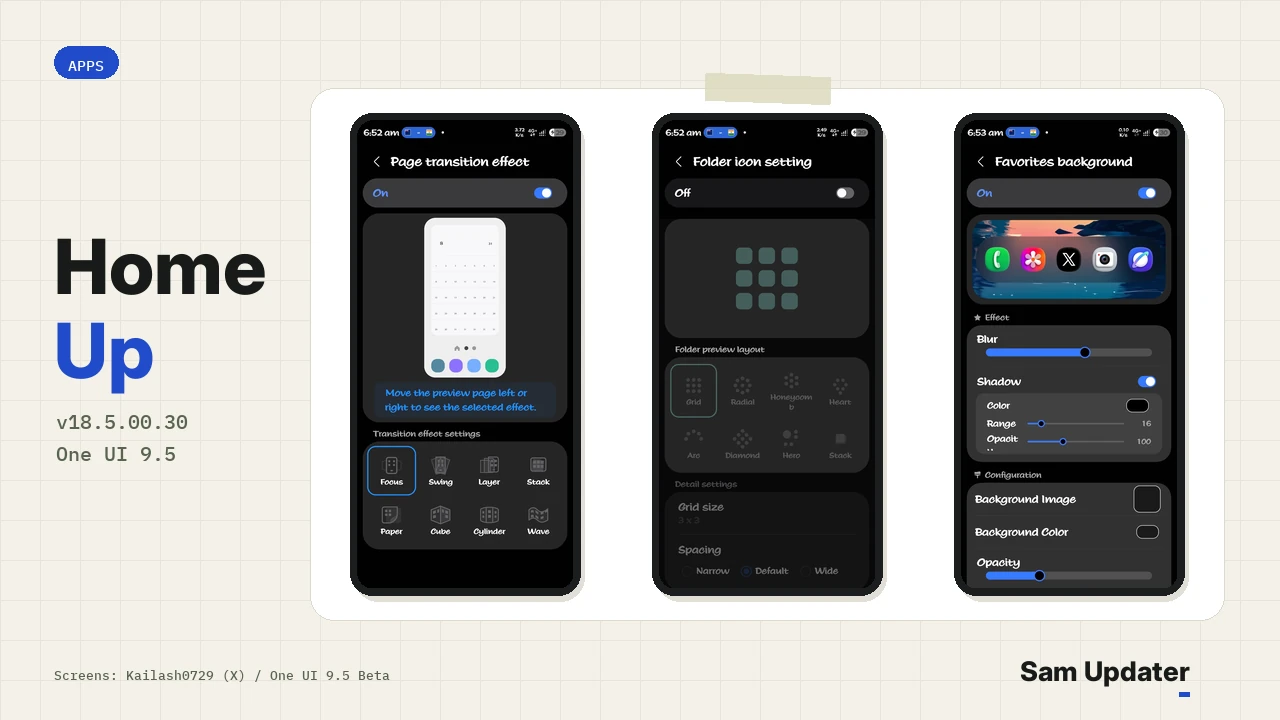
Samsung Home Up 18.5.00.30 is now on Galaxy Store for the Korean Galaxy S26, S26+ and S26 Ultra running the One UI 9.5 beta. The update adds eight page transitions and eight folder shapes, and our check of the 28.32 MB APK turned up four Edge panels and a drawing tool for stickers.
Update: November 28, 2026. Our first store check found 18.0.00.38 in all six markets. When we checked again, Samsung offered 18.5.00.30 to the Korean Galaxy S26 (SM-S942N), S26+ (SM-S947N) and S26 Ultra (SM-S948N) on the beta. The same three models still got 18.0.00.38 when we checked them on One UI 9.0.
What if you have an S26 Ultra outside Korea? Our Galaxy Store checks for India, Germany, the US, China and Hong Kong still returned 18.0.00.38 on both One UI 9.5 and 9.0.
Before the Korean store update appeared in our checks, the 18.5.00.30 package circulated in a post by Ice Universe on X. Minutes later, live menu screenshots from Kailash0729 on X showed the new menus running on One UI 9.5 Beta. We verified the circulating APK against Samsung’s official signing certificate and uploaded the untouched file to our Telegram channel below.
What is new in Samsung Home Up 18.5.00.30 for One UI 9.5?
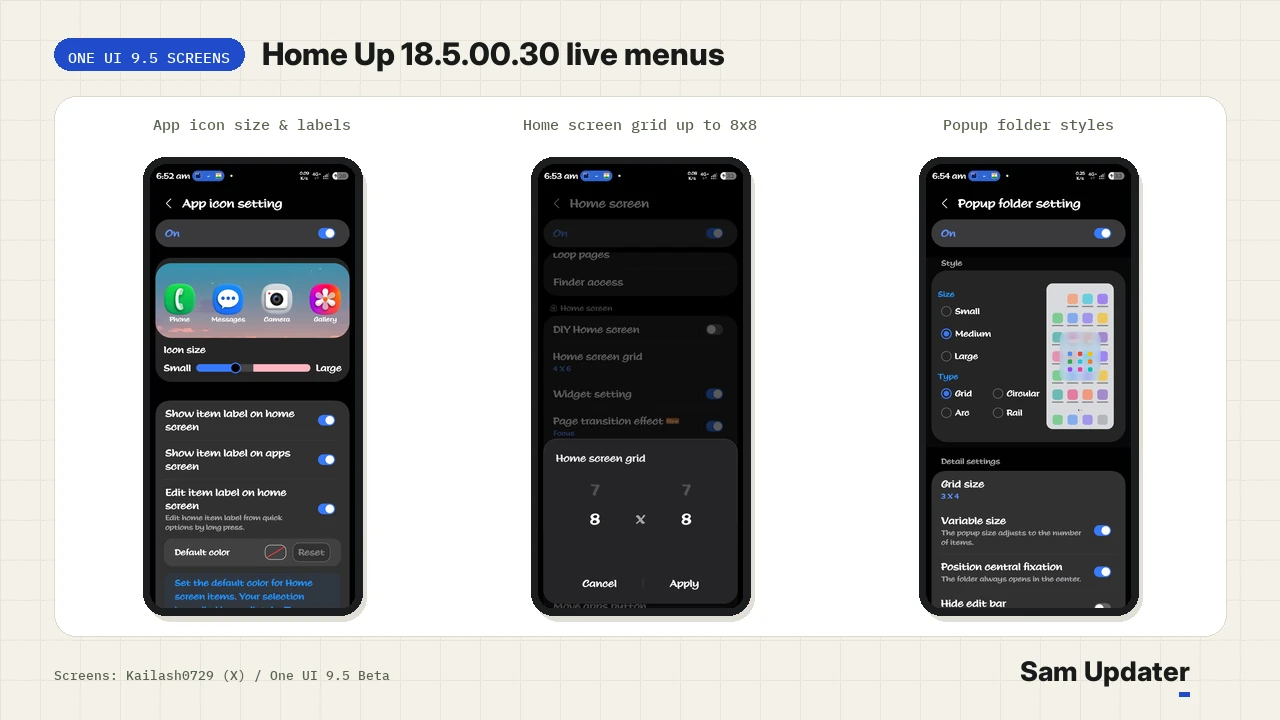
Version 18.5.00.30 brings 8 page transition effects, 8 folder preview shapes, an App icon size slider, Favorites blur controls, an 8×8 grid, and four Popup folder styles. All six visual upgrades run inside the Good Lock Home Up module on Android 17.
Live One UI 9.5 Beta screenshots from Kailash0729 show each menu active right now:
- Page transition effect adds a live preview page with 8 swipe animations: Focus, Swing, Layer, Stack, Paper, Cube, Cylinder, and Wave. Our APK inspection also spotted Sphere and Cards entries in the code.
- Folder icon setting switches previews across Grid, Radial, Honeycomb, Heart, Arc, Diamond, Hero, and Stack shapes. Underneath, you can adjust Grid size and set Spacing to Narrow, Default, or Wide.
- App icon setting pairs a Small-to-Large Icon size slider with toggles for home screen labels, apps screen labels, and long-press label edits. It also adds a Default color picker with a Reset button.
- Favorites background adds a Blur slider and a Shadow toggle with Color, Range, and Opacity sliders. Background Image and Background Color pickers sit right below.
- Home screen grid now stretches up to 8×8 on the selector wheel. Big Galaxy displays get much tighter icon density than earlier One UI builds.
- Popup folder setting offers Small, Medium, and Large sizes across Grid, Circular, Arc, and Rail layouts. You also get Variable size, Position central fixation, and Hide edit bar toggles.
These controls match the wider launcher refresh we tracked in our One UI 9.5 Beta changelog for the Galaxy S26 and our NavStar 9.5.01.2 update breakdown. To see how the base launcher works with Good Lock, read our guide on what One UI Home does on Samsung phones.
Hidden features our APK teardown found inside 18.5.00.30
Diffing the signed 18.5.00.30 APK file by file against Galaxy Store’s 18.0.00.38 uncovered three big additions missed in early posts. Samsung bundled four new Edge panels, a custom drawing sticker tool with AI background removal, and a 55.5 percent smaller package.
Here is what sits inside the verified manifest and resource tables:
- Four bundled Edge panels arrive under a new More Edge panels screen: Calculator, Calendar with a D-Day editor, Notification center with search and filters, and Recent Files. Recent Files lists opened or downloaded items with rename, compress, extract, and delete tools.
- Edge panel customization gains panel background matching. It also adds an Allow all panels toggle for third-party panels on large-screen Galaxy devices.
- Custom drawing stickers now bundle Google ML Kit Subject Segmentation inside Home Up. New strings point to a Drawing canvas with Pen, Pencil, Marker, Crayon, and Eraser tools plus a Remove background option for gallery photos.
- Download size drops from 63.67 MB in 18.0.00.38 to 28.32 MB in 18.5.00.30. The older Galaxy Store package stored its DEX bytecode uncompressed, while 18.5.00.30 compresses all eight DEX slices even as total files rise from 3,204 to 3,362.
Keep one caveat in mind. Finding Edge panel and sticker modules inside a signed beta APK confirms Samsung built them into this release. Even so, some toggles can wait for a matching One UI 9.5 Home launcher build before showing up. We spotted the same staged pattern in our Samsung Health 7.1.4.003 vs. 7.2.0.041 teardown.
Samsung Home Up 18.0.00.38 vs. 18.5.00.30 package comparison
Both APKs carry the exact same official Samsung Corporation signing certificate from Suwon City. Still, they differ sharply in compression, file size, and bundled modules. Every figure below comes from our November 28 check of both untouched files.
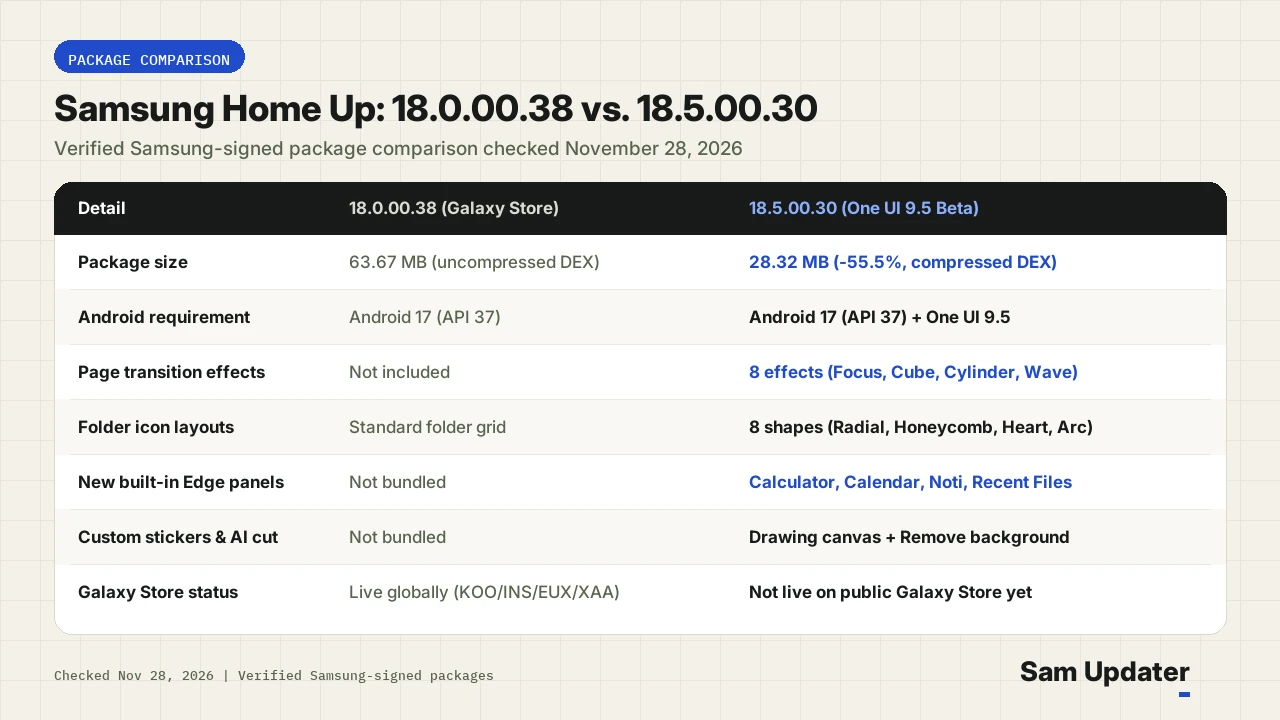
| Feature or field | Home Up 18.0.00.38 (Galaxy Store) | Home Up 18.5.00.30 (One UI 9.5 Beta) |
|---|---|---|
| Package name | com.samsung.android.app.homestar | com.samsung.android.app.homestar |
| Version code | 1800005038 | 1850005030 |
| Exact file size | 63,672,979 bytes (63.67 MB) | 28,323,634 bytes (28.32 MB) |
| Minimum / Target SDK | API 37 (Android 17) | API 37 (Android 17) |
| Page transition effects | Not included | 8 effects in UI (Focus to Wave) |
| Folder icon shapes | Standard grid | 8 preview layouts (Grid to Stack) |
| Bundled Edge panels | Not bundled | Calculator, Calendar, Notification, Recent Files |
| Custom stickers & ML Kit | Not bundled | Drawing canvas + Remove background |
| Public Galaxy Store status | Galaxy S26 Ultra in INS, EUX (Germany), XAA, CHC and TGY. Korean S26 models on One UI 9.0 also got this build. | Korean Galaxy S26, S26+ and S26 Ultra (KOO) on the One UI 9.5 beta |
To check your own phone, open Galaxy Store, tap Menu, then Updates and look for Home Up. Samsung’s app update guide shows where to find the list. You can also find the main Good Lock app on Google Play.
Download verified Samsung Home Up 18.5.00.30 APK and supported devices
Installing Home Up 18.5.00.30 requires Android 17 (API 37), and the new menus activate only on Galaxy phones running One UI 9.5 Beta. Phones on One UI 8.5 (Android 16) or older cannot install it because Android enforces the API 37 cutoff.
VERIFIED SAMSUNG-SIGNED APK
Samsung Home Up 18.5.00.30 (One UI 9.5)
28.32 MB (28,323,634 bytes) | Android 17 (API 37) and One UI 9.5 Beta | Untouched Samsung Corporation signature verified across all 3,359 files.
| Verification detail | Verified value |
|---|---|
| File name | HomeUp_18.5.00.30.apk |
| Package name | com.samsung.android.app.homestar |
| Version / versionCode | 18.5.00.30 / 1850005030 |
| Exact file size | 28,323,634 bytes (28.32 MB) |
| Minimum / Target Android | Android 17 (API 37) / Android 17 (API 37) |
| Signing certificate | Samsung Corporation (CN=Samsung Cert, Suwon City), exact SHA-256 cert match to Galaxy Store 18.0.00.38 |
| Integrity check | PKCS#7 signature valid; 3,359 of 3,359 signed files matched with 0 unsigned files |
| SHA-256 checksum | 3bf53d239add5b4e986327b81a57da505fb1806e66fd1444be1f3762d68f3e14 |
| Galaxy device and OS group | Compatibility status | Recommended build |
|---|---|---|
| Galaxy S26 series on One UI 9.5 Beta (Android 17) | Supported for new 18.5.00.30 features | Home Up 18.5.00.30 |
| Galaxy phones on stable One UI 9.0 (Android 17) | Installs on API 37, but One UI 9.5 launcher hooks may not activate | 18.0.00.38 on the One UI 9.0 models checked |
| Galaxy devices on One UI 8.5 (Android 16) or older | Unsupported (blocked by minSdkVersion 37) | Use Galaxy Store 17.5.00.30 or earlier |
If Galaxy Store offers 18.5.00.30, tap Update there. If you use the One UI 9.5 beta and prefer to install the verified APK yourself, here’s how:
- Open the verified HomeUp_18.5.00.30.apk post in Telegram and save the file to your phone.
- Go to Settings > Security and privacy > Install unknown apps and allow your file manager or Telegram to install APKs.
- Tap HomeUp_18.5.00.30.apk in My Files and select Update when prompted.
- Launch Good Lock, open Home Up, and check the Home screen, Folder, and Edge panel menus for the new options.
You can track One UI 9.5 Beta firmware builds for your exact model and CSC on our live Firmware Checker, or get alerts inside the SamUpdater Android app.
Did Home Up 18.5.00.30 turn on Page transition effects and the new Edge panels on your Galaxy phone? Drop your model number and One UI version in the comments so we can track which builds enable every menu.
Was this article helpful?
Your answer helps us keep it accurate.
Comments (0)
Comments are moderated, and published only if they are relevant to the topic and add value in a constructive way. If you disagree with something, please be polite and respectful.