
Download the Samsung Android USB Driver from Samsung Developer, open the Windows installer on your PC, and complete its setup before reconnecting your Galaxy. If you already use Smart Switch, its Reinstall device driver option provides another supported route. Check the connection for the task you actually need, because copying files and using ADB have different requirements.
I will show you where the official package comes from, how to inspect its signature in Windows, and how to check the phone connection afterward. Charging alone is not a useful confirmation that the data connection works.
Get the Windows package directly from Samsung
The Samsung Android USB Driver page is the download source. Samsung describes this driver for connecting a Samsung Android device to a Windows development environment over USB.
At the November 3, 2026 research check, Samsung listed version 1.9.5.0, dated May 6, 2026, with a displayed size of 35.5 MB. The download response identified the file as SAMSUNG_USB_Driver_for_Mobile_Phones_v1.9.5.0.exe. Use the package currently offered by Samsung if its version has changed.
- Open Samsung's driver page on your Windows PC.
- Select its Samsung Android USB Driver for Windows download.
- Locate the downloaded file in the folder where your browser saved it.
- Check that you are opening that download rather than another driver installer saved earlier.
There is no need to collect several old driver releases before trying the official one. Keep a record of the version you installed, so a later troubleshooting check has a specific starting point.
Inspect the downloaded file's signature
Windows PowerShell can read a file's Authenticode signature. Microsoft documents Get-AuthenticodeSignature for that purpose; the command returns signature information rather than running the installer.
Open PowerShell in the download folder and use the actual filename. For the package listed above, the command is:
Get-AuthenticodeSignature -LiteralPath ".\SAMSUNG_USB_Driver_for_Mobile_Phones_v1.9.5.0.exe" | Format-ListIf you use a full path, replace the quoted text with that file's complete location. Review Status and the signer information in the result. Microsoft uses Valid as the status for a valid signature; an unsigned file does not provide the same signature details.
If the result is unexpected, get a fresh copy through Samsung's page before proceeding. A signature check is about the downloaded file. You still need to complete setup and check whether Windows recognizes the intended phone connection.
Install, or use Smart Switch's repair option
Open the downloaded Samsung installer and follow its setup prompts on Windows. Finish that setup before checking the device again. This installs the computer-side driver; it is not a phone firmware update.
If your problem is specifically Smart Switch not detecting the phone, Samsung's US recognition guide documents this alternative:
- Disconnect the Galaxy and restart it.
- Open Smart Switch on the computer.
- Select More options, the three vertical dots in the upper-right corner.
- Choose Reinstall device driver, then Confirm.
- Reconnect the phone when driver installation is finished.
Samsung notes that a computer restart may also be needed. Pick the route for your situation rather than repeatedly installing both packages without checking the result.
Check file access on the connected Galaxy
For ordinary file copying, Samsung Canada's file-management instructions require a data-capable USB cable and the phone's file-transfer permission. A driver cannot give a charge-only cable the ability to carry data.
- Connect the Galaxy to the PC with a USB cable that supports data transfer.
- Keep the phone's screen unlocked and open its notification panel.
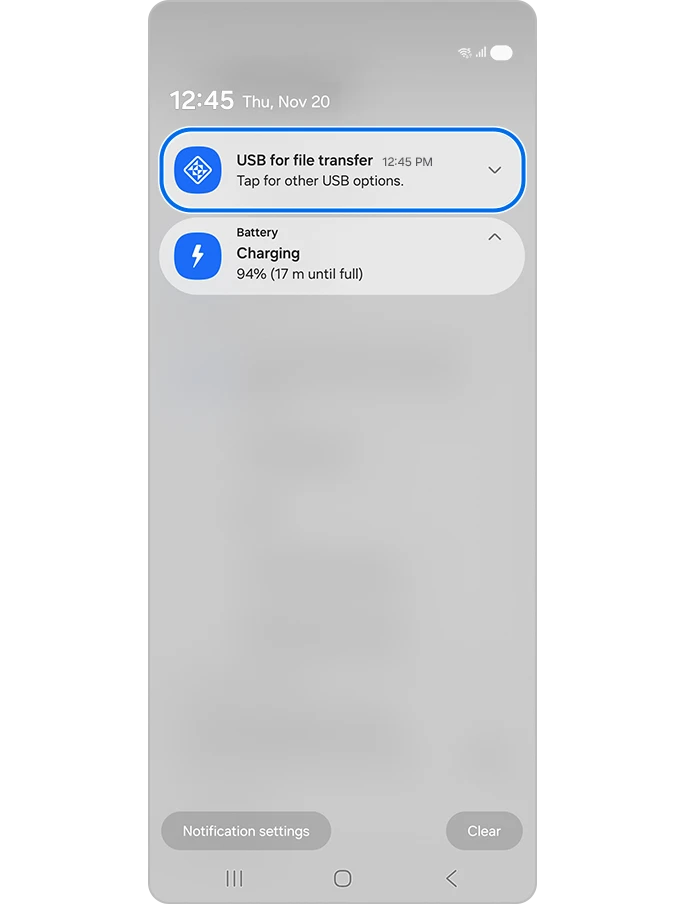
- Tap the USB for file transfer notification to inspect the USB mode.
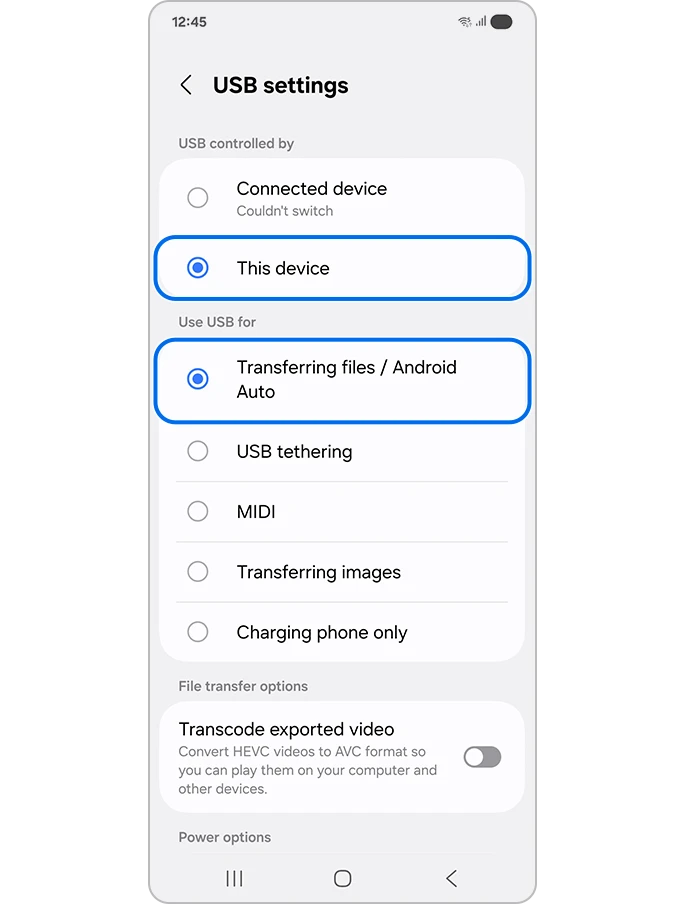
- Under Use USB for, select Transferring files / Android Auto.
- If Allow access to phone data appears, review the connected computer and tap Allow only when you intend to grant it file access.
- Open a small copied file on the PC to confirm the result before moving a large selection.

For missing or inactive USB choices, follow our Galaxy file-transfer checks. If detection works but a backup reports insufficient storage, our Smart Switch space comparison addresses that different problem.
FAQ
Does the driver download install ADB?
Google distributes ADB in its Android SDK Platform Tools. ADB use also requires USB debugging and approval of the computer's debugging key on the device. A working file-transfer connection is therefore a separate check from a working ADB session.
Should I use the Google USB Driver for a Samsung phone?
Google identifies its USB driver for Google devices and directs other manufacturers' devices to their own drivers. For a Galaxy, use Samsung's package. Google also says macOS and Linux development do not require the Windows USB-driver installation. If setup fails, share the Windows version, Galaxy model, and exact error text.
Was this guide helpful?
Your answer helps us keep it accurate.
Comments (0)
Comments are moderated, and published only if they are relevant to the topic and add value in a constructive way. If you disagree with something, please be polite and respectful.