
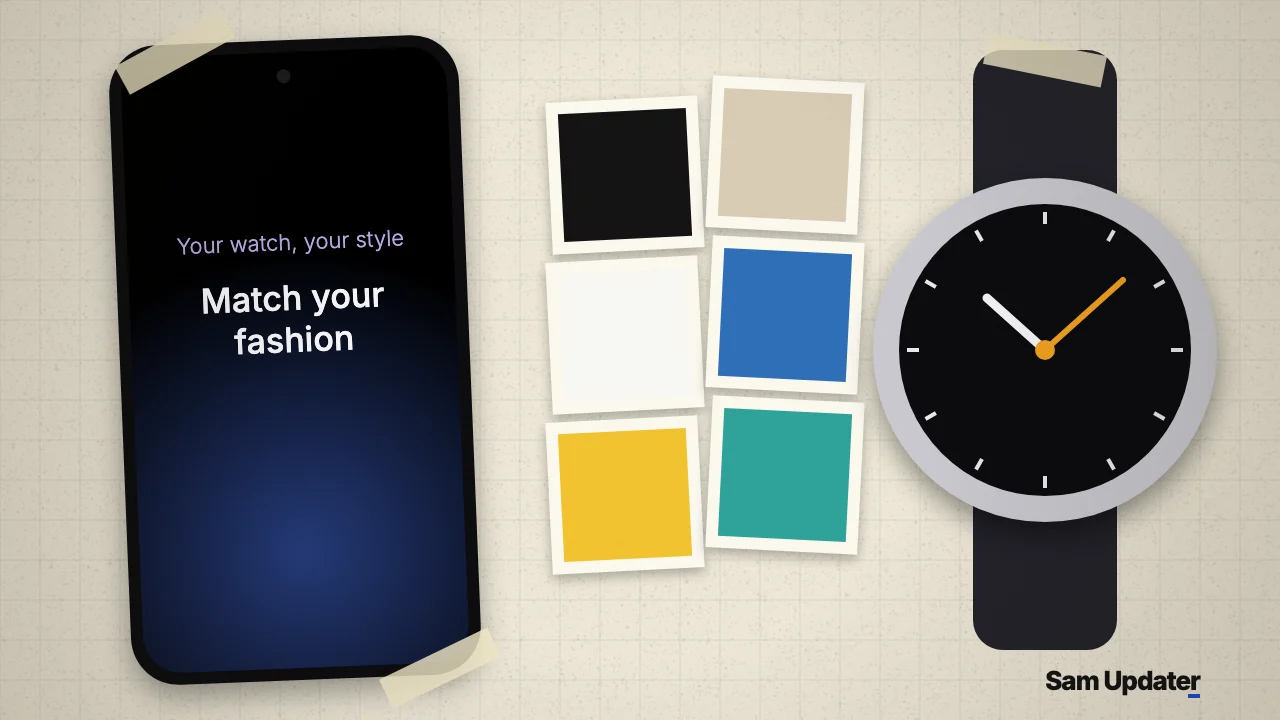
A new Match your fashion section has appeared in the Galaxy Wearable app, according to a post on X from November 7, 2026. You pick an outfit style from six photos, and the app recommends watch faces to go with it. To look for it, open Galaxy Wearable and scroll through the first tab, the one with the clock icon.
This is a very early sighting. It rests on one post with screenshots from a phone paired to a Galaxy Watch8 Classic, and Samsung hasn’t announced the feature. The Galaxy Wearable listing on Galaxy Store still says only “Supports new devices” under What’s New.
What the Galaxy Wearable screen shows
The section sits under the line “Your watch, your style”. Below the Match your fashion heading, the text reads: “Choose an outfit style and get recommended watch faces.”
Then come six photos, and each one is a different look:
- A black suit
- A beige coat with a black bag and a coffee cup
- A plain white T-shirt with jeans
- A yellow top with baggy denim shorts
- Bright jackets with colored sunglasses
- A running outfit with a teal T-shirt and black shorts
Three other labels are cut off at the top of the screenshot: Live wallpaper, Steps challenge and Cute Character. So Match your fashion looks like one more collection in a longer list, not a separate menu.
Here’s what we don’t have yet. The post stops at this screen, so it doesn’t show the recommended watch faces. We can’t say how many you get, whether they’re free or paid, or if they come from Samsung or the Galaxy Store.
How Match your fashion differs from My Style
Samsung already has an outfit feature in this app, and it’s easy to mix the two up. My Style builds a background from your own photo. Samsung Australia’s watch face guide gives this path: Galaxy Wearable > Watch faces > Wallpaper > My Style > Customise. You take a picture or choose one from Gallery, drag a circle over the colors you want, and pick a pattern.
| Feature | What you give it | What you get |
|---|---|---|
| My Style | Your own photo | A custom background in those colors |
| Match your fashion | One of six outfit styles | Recommended watch faces |
That second row comes from the on-screen text only. Nothing in the screenshots shows a camera button, so your own outfit photo doesn’t seem to be part of it for now.
If you want a watch face that goes with your clothes today, My Style is the one that works now. Photograph your shirt or jacket, and the background picks up those colors. You’re changing one face that way, not browsing a list of suggestions.
Check for it in Galaxy Wearable
The post calls this the latest Wearables app, but it doesn’t give a version number. So the best check is to update and look.
- Open Galaxy Store, tap Menu, then tap Updates.
- Install Galaxy Wearable if it’s on the list.
- Open Galaxy Wearable and stay on the first tab at the bottom of the screen.
- Scroll until you see “Your watch, your style”.
Not there after the update? Don’t read too much into that yet. The only sighting so far comes from a single paired watch.
Which Galaxy Watch models could get it?
The only watch shown is the Galaxy Watch8 Classic, so nothing confirms support for older models yet.
We keep the watch software side in our One UI 9 Watch guide, including which Galaxy Watches are in line for it. For your phone, our One UI 9 update tracker shows the latest rollout status by model. Our One UI 9 features page covers what else changed on the phone side.
Was this guide helpful?
Your answer helps us keep it accurate.
Comments (0)
Comments are moderated, and published only if they are relevant to the topic and add value in a constructive way. If you disagree with something, please be polite and respectful.