
One UI 9 is Samsung’s Android 17 update, and it’s now rolling out, starting with the Galaxy S26 series. It debuted on the Galaxy Z Fold8 Ultra, Z Fold8 and Z Flip8.
So what’s actually new? In this post, I will walk you through every major One UI 9 feature, what it does in real life, and whether your phone will get it.
I’ve gone through Samsung’s official One UI 9 announcement for this, including the fine print.
1. My FanCam
This is the one most people will try first. You pick a person in a video you’ve recorded, and One UI 9 follows them and keeps them in the center of the frame, reframing the clip as they move around.
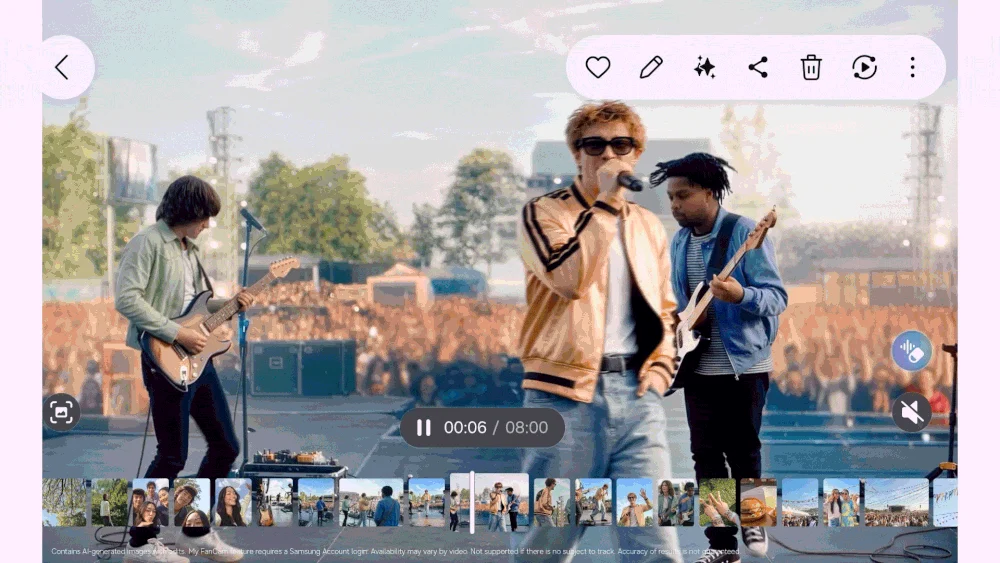
Think of your kid’s dance recital or a friend on the football field. Instead of a wide shot where they’re a tiny dot, you get a clip that’s all about them.
It needs a Samsung account, and it won’t work if there’s no clear person to track.
2. Now Brief With Generative and Editable Cards
Now Brief is the daily summary Samsung added with the Galaxy S25. In One UI 9, you can finally decide what goes in it.
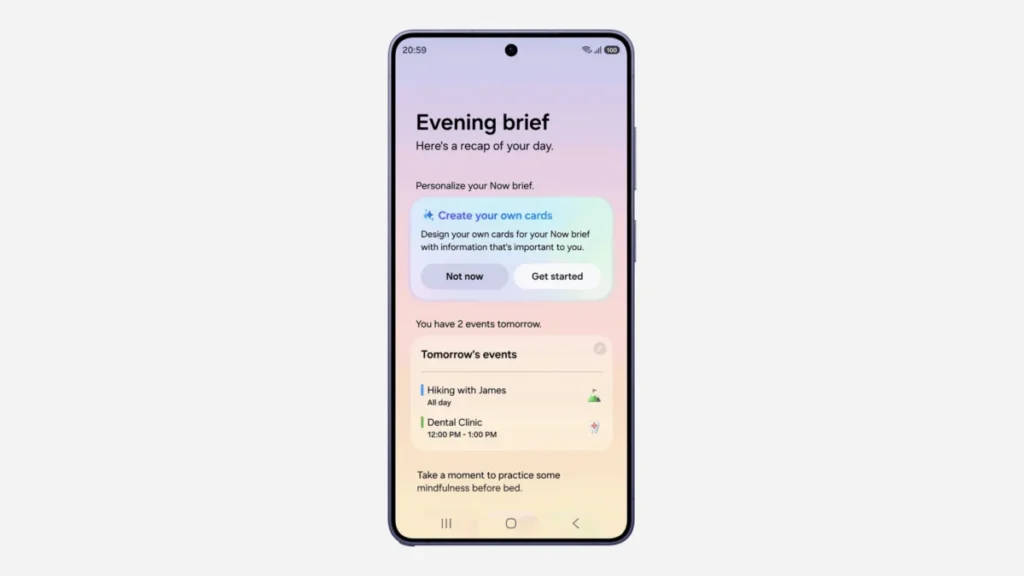
You can create your own cards for things like health, weather and video, so your morning brief shows what you actually care about, not just what Samsung thinks you want.
3. Now Nudge
Now Nudge suggests your next step based on what you’re doing. Samsung’s example is a good one: while you’re making plans over text, it can pull up reservation details or save a shared location without leaving the chat.
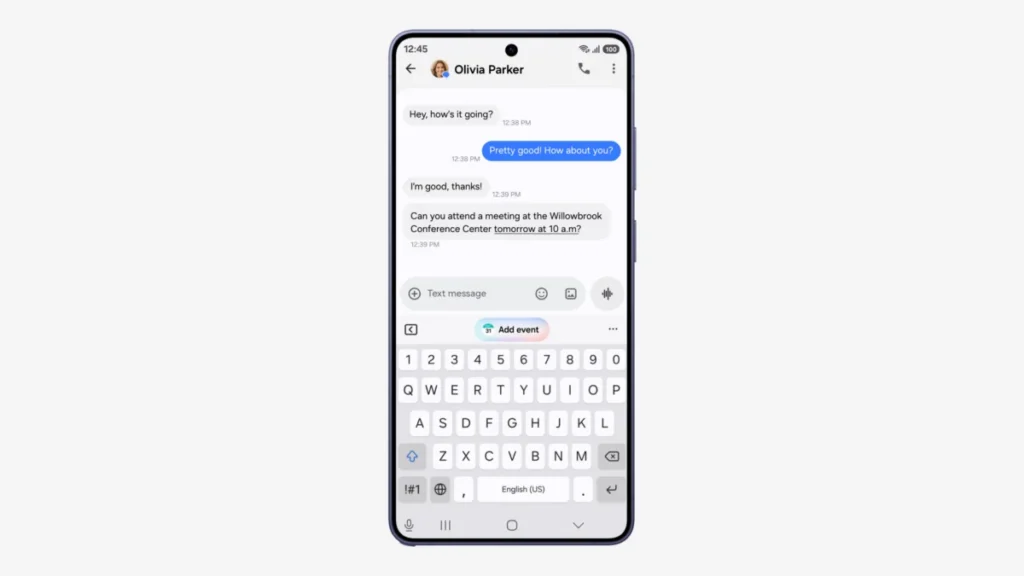
It works in Samsung Messages, Google Messages and Google Chat, among others.
4. Warranty and Care in Settings
Here’s one I really like. There’s now a Warranty and Care section right in Settings.
From there, you can check warranty coverage for your connected Galaxy devices, run self-diagnostics, see estimated repair costs, manage Samsung Care+ and book a service appointment. Availability depends on your country, though.
5. Creative Studio Suggestions
Creative Studio now suggests image ideas based on upcoming events. If a friend’s birthday is coming up, it may prompt you to create a themed greeting image.
6. Interpreter Thread View
The Interpreter app gets a new Thread View, so you can scroll back and see earlier parts of a translated conversation. Conversation Mode is also faster, and playback through compatible Galaxy Buds has less delay.
7. Better Document Scan and Finger Eraser
Document Scan now handles curved book pages and papers with folded corners with less manual fixing. The Finger Eraser, which removes your fingers from a scan when you’re holding the page, has also been improved.
8. Voice Recorder Summaries
Voice Recorder summaries now use headings and tables, which makes a long meeting recording much easier to skim.
9. Security Brief
Security Brief puts key security alerts into Now Brief. That includes malware warnings, apps installed from unknown sources and apps with permissions they don’t need.
Along with monthly patches, this is a nice way to keep an eye on your phone’s safety. You can check the patch status for your device in my Samsung security update tracker.
10. Privacy Alerts
Privacy Alerts use on-device AI to spot apps trying to use permissions in the background when they don’t need to.
This one is limited to newer devices. According to Samsung, it’s supported on:
- Galaxy S26, S26 Ultra, S25, S25 FE, S24, S24 FE, S23 and S23 FE.
- Galaxy Z Fold8 Ultra, Z Fold8, Z Flip8, Z Fold7, Z Flip7, Z Fold6, Z Flip6, Z Fold5 and Z Flip5.
- Galaxy Tab S11 Ultra, Tab S11, Tab S10 Ultra, Tab S10+, Tab S9 Ultra, Tab S9+ and Tab S9.
11. Scam Detection in More Countries
Scam Detection warns you about possible scam calls. With One UI 9, it’s expanding to Japan, Canada and India.
For India especially, this is a big one. If you’re waiting for the update there, here’s my post on the One UI 9 release date in India.
12. Android 17 Under the Hood
Beyond Samsung’s features, you also get everything that comes with Android 17 itself, plus the latest security patch bundled in the update.
For the Galaxy S26 in Korea, the One UI 9 build (S948NKSU4BZI6 on the S26 Ultra) came with the September 2026 security patch.
Which Phones Get One UI 9 Features?
Every eligible phone gets One UI 9 itself. But like every big update, some features depend on your hardware, your country and your Samsung account.
Here’s the rough rule:
- Newer flagships (Galaxy S24 and newer, Z Fold6 and Z Flip6 and newer) should get almost everything.
- Galaxy S23 series and the Z Fold5 and Z Flip5 get most of it, including Privacy Alerts.
- Galaxy A series phones get the core update, but some Galaxy AI features may be missing.
Check whether your phone is on the One UI 9 device list, and see if it has the update yet in the One UI 9 update tracker.
Most of the AI features need you to sign in to your Samsung account. If something is missing after the update, check Settings > Accounts and backup first.
Frequently Asked Questions
Is One UI 9 a big update?
Yes. It’s a full Android version upgrade (Android 16 to Android 17), so expect a download of several gigabytes.
Can I go back to One UI 8.5 if I don’t like it?
On the Galaxy S26, yes, for now. Here’s how to downgrade One UI 9 to One UI 8.5.
Will the Galaxy S22 get these features?
No. The Galaxy S22 series isn’t getting One UI 9.
Final Words
One UI 9 isn’t a huge visual change, but it adds a lot of small, useful things, and Warranty and Care, My FanCam and Scam Detection are the ones I’d try first.
Which feature are you most excited about? Let me know in the comments below, along with your model number, and I’ll tell you if your phone supports it.
Was this guide helpful?
Your answer helps us keep it accurate.
Comments (0)
Comments are moderated, and published only if they are relevant to the topic and add value in a constructive way. If you disagree with something, please be polite and respectful.