
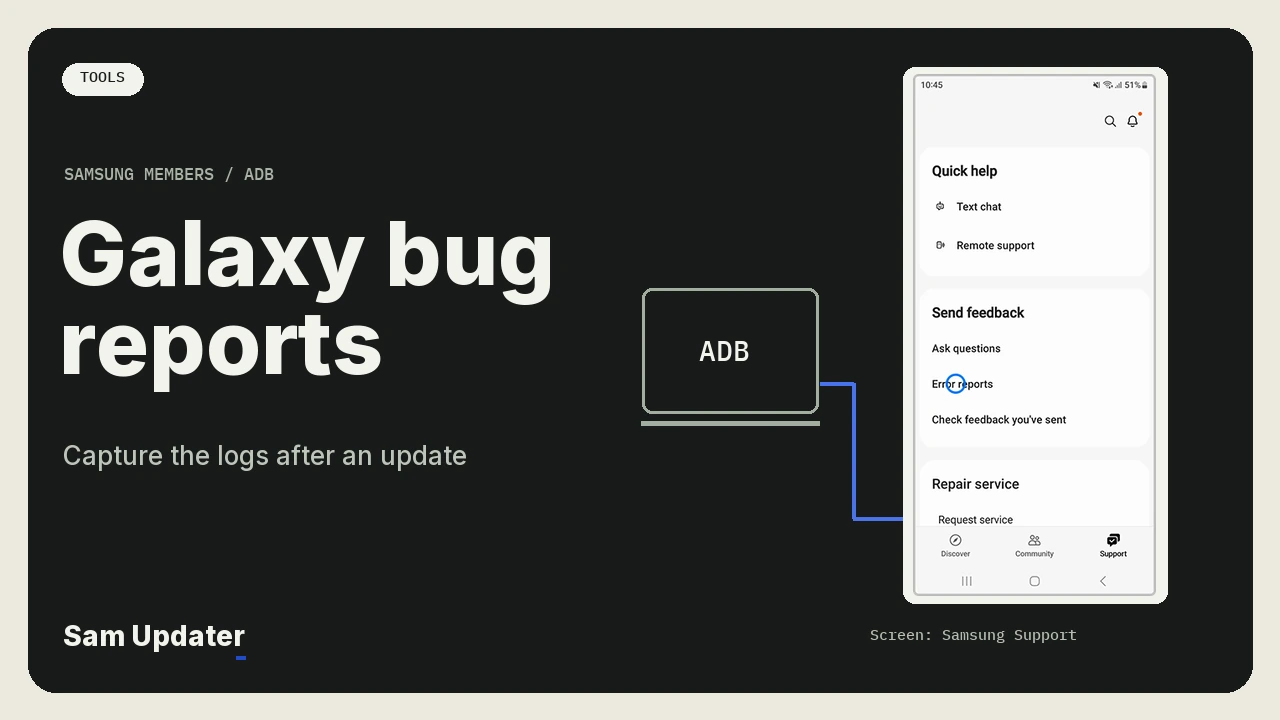
Open Samsung Members and send a Galaxy bug report while the problem you saw after the update is still fresh. If a developer asks you for an Android bug report ZIP, use your computer to save a local copy and share it privately with the person handling your case.
Which report does support need?
Samsung Members sends your description and the system logs together to Samsung. An app developer who asks for a ZIP needs a file they can open on their own computer. Android Debug Bridge (ADB) saves that file on yours first. You can then attach it to the case the developer is investigating.
Timing matters more than a perfectly worded description. Samsung Singapore asks you to file within five minutes of the issue. If it just happened, skip ahead to the Members steps now.
You can put together a more detailed explanation afterward and reply to Samsung in the same conversation.
Give Samsung a way to repeat the problem
I like to write down the last tap before anything went wrong. If a music control disappeared, for example, say whether the song kept playing when you locked the screen. Our Now Bar music guide explains why the app and lock screen settings matter for that particular symptom.
| Field | What to put in your report |
|---|---|
| Model and region | Copy the model number from Settings > About phone. Include your carrier and the service provider software version if you’re unsure which three-letter CSC applies. |
| Installed software | Under About phone > Software information, copy the build number exactly. Add the One UI and Android versions shown there. For an app problem, include the app name and version if known. |
| Time and frequency | Give the local date, time and time zone of the occurrence. Say whether it happened once or which attempts produced the same result. |
| Steps | Name the screen where you began. List the taps in order, including anything the phone was connected to when the symptom appeared. |
| Expected and observed | Write one line for what you expected. On a second line, describe what stayed visible, disappeared or stopped responding. Copy any error text exactly. |
Use the installed build for that first report. Our Firmware Checker lets you look up the latest tracked release for the model and CSC separately. If you’re watching for a later update, our SamUpdater Android app can follow that combination.
A newer entry in the tracker doesn’t tell support what was running when the error occurred.
A small detail can change the question. In our Galaxy Z Flip7 Memory Guardian report, one screen still showed the amount of memory in use while another reading failed.
For a clock complaint like the one in our One UI 9 leading-zero report, include the clock style and what the digits looked like. Neither description requires guessing what Samsung changed.
Send the error from Samsung Members
- Open Samsung Members, select Support and tap Error reports. The Samsung US instructions also give you a shortcut. Touch and hold the Members app icon, then choose Error reports from its menu.
- Pick the category closest to the fault. If Members asks how often it happens, choose the frequency that matches what you’ve seen.
- Enter the symptom time and the short sequence of taps. Use the attachment control if a picture shows something the description misses. Check the picture for private messages or account details first.
- Select Send system log data if you want Samsung to receive the logs. Tap Send and leave Members open while it collects them.

To read Samsung’s reply, open Support in Members and select Check feedback you’ve sent. If the problem returns, note the new time. For something like a stuck Google Play system update, include whether the screen kept searching, showed a download error or came back to the same date after a restart.

Save the Android bug report on your computer
Use a computer you trust with the Android SDK Platform-Tools and USB debugging set up. Open a terminal where you can run adb. Google’s bug report instructions explain how to choose a destination and what Android puts inside the archive.
- Connect the Galaxy over USB, run
adb devicesand approve the debugging connection on your phone if prompted. Confirm the intended device appears before collecting anything. - With only that phone connected, run
adb bugreport. Leave the connection in place until the command finishes. Without a destination argument, the report goes into the terminal’s current directory. - Locate the ZIP and keep your worksheet with it. Match its timestamp to the event before attaching it to the private support case.
The main text file inside includes system service output, error logs and messages written by apps. A screenshot of one dialog shows much less than that archive. Check who’s asking for the ZIP and how they want to receive it before sharing.
For a public discussion, post the symptom and a cropped screenshot with personal information removed.
Frequently asked questions
Can I close Members while it generates the logs?
No. Samsung Singapore asks you to keep Members open during log generation. If you accidentally closed it, look under Support for the feedback you sent before assuming it arrived. If there’s no report and the symptom returns, capture that occurrence and use its time in your description.
Can I send an error from Samsung Notes itself?
Yes. Samsung US lists Notes among the apps that accept reports through their own settings. In Notes, open Menu, then Settings, Contact us and Error reports. That gives you a place to describe the specific note action that failed. Leave the contents of private notes out of the description.
How do I select the right phone when ADB lists two devices?
The serial number in the output of adb devices identifies the target for the command. Use adb -s SERIAL bugreport, replacing SERIAL with the entry for your Galaxy. If the two entries look unfamiliar, disconnect the other device and list them again before collecting either phone’s logs.
Was this guide helpful?
Your answer helps us keep it accurate.
Comments (0)
Comments are moderated, and published only if they are relevant to the topic and add value in a constructive way. If you disagree with something, please be polite and respectful.